Free dynamic DNS – he.net and ddclient

Recently set up ddns (dynamic DNS)  for my Linux workstation successfully. The general intention for ddns is to allow remote access to the workstation where there is no static IP but dynamic IP from DHCP. A lot of ISPs provide the domain and ddns service either for free or not. In my implementation, I have bought a domain from domain.com (yep, this is not free) and used the ddns service from he.net (yes, it is free!). Anyway, hope this post could give some hints for the newbies, like myself.

0. If you want your own domain name…
This may be the first thing we need to make it clear. Actually, there are some ISPs providing the free domain and ddns the same time. For sure, the domain is kind of subdomain of the ISP, like yourTargetDomain.DomainOfISP. If you decide to choose the free the domain as well as the ddns from the ISP, then please follow the detailed instruction from that ISP and refer to the ddclient down there maybe for your reference.

1. Get your domain
Get your target domain for any ISP. For instance, I have bought the domain ‘daveti.me’ from domain.com. After you bought the domain, you should be able to login your account and find the settings for that domain, like DNS, nameserver, FTP, mail. and etc. We will need some changes here later for ddns configuration. But not now…

2. Get the dynamic DNS service
Find what ever ISP you want, which provides the ddns service, either for free or not. Here, I choose he.net, which is free! After the quick registration, please click the free DNS, where you could find the detailed instruction on the features provided by he.net, as well as some configuration example.

3. Configure the ddns on dns.he.net
After login, you will be asked to add a new domain name into your ‘Zone’. Yes, we will add the newly bought domain there. Then click ‘edit’ for the newly added domain, you will find few entries added for the domain with different nameservers, like ‘ns1.he.net’, ‘ns2.he.net’…Remember all the names of these nameservers. We will use them later. Then, please click ‘New A’ above, which will create an A record used for IPv4 address query during DNS analysis. Put the same domain name as the name of the A record; put your current IPv4 address (ifconfig -a for Linux, ipconfig /all for Windows) into the address field; set the the TTL to be the minimum value, like 5 min ~ cause we are using DHCP instead of static IP; choose the ‘enable dynamic dns’ feature – again, we want ddns, right? The same stuffs happens for the AAAA record, which is used for IPv6 address. You need the same name for the record and put your current IPv6 address there, as well as the same TTL and ddns enabling. Once it is done, you will find the 2 newly added entries in the domain management window, as well as the nameservers mentioned before. Click the DDNS column in the A record, generate the ‘key’ and submit. Note, save the key here! Click the same field in the AAAA record and use the same ‘key’ and submit.
After the dns.he.net configuration, you should save the names of the nameservers and the name and the key used in both the A record and AAAA record. NOTE: both the name and the key are eventually the same for the 2 records!

4. Reconfigure the domain
Let’s come back to your domain ISP, where we need to change the nameservers for our domain. The default nameservers should be provided by your domain ISP. But for ddns, we need to use the nameservers provided by the ddns ISP, like he.net. Remember the names of nameservers we have saved before? Let’s remove the default ones and add our ddns enabled nameservers.

5. ddclient
So far, both the domain and ddns services are ready now, which means given the DNS query for our domain, the nameserver would return the right IP address. The only problem is how could we update the IP address within the nameserver. There are a few client tools which are able to do this job. We will use ‘ddclient’ here, which is kind of standard choice under Linux and is supported by he.net the same time. After downloading and installation, we need to configure the ddclient.conf under /etc adding support for dns.he.net

# daveti
# Hurricane Electric
# dyn.dns.he.net
protocol=dyndns2    # default
use=if                          # use the eithernet card (to get the current IP)
if=em1                         # use certain interface (ifconfig -a, to get the current IP)
server=dyn.dns.he.net # default
login=daveti.me        # the name of the A/AAAA record
password=adfadfa   # the key of the A/AAAA record
daveti.me                   # the domain name

After the configuration, all we need to do is to start the ddclient service – just run ‘ddclient’. You will find the the ddclient service keeping running when ‘ps -ef | grep ddclient’.

6. Make it perfect
Till now, if we are lucky enough, we have done all the configuration for ddns. Moreover, we want to make things perfect. So we will try to change the hostname of the machine to the new domain name and add the ddclient service into the the startup of our machine. The way to change the hostname permanently in Fedora Linux is to add new domain name into /etc/hostname and add new line ‘HOSTNAME=domainName’ into /etc/sysconfig/network. The way to start ddclient when the machine is up is to add ddclient into the ‘startup application’ via ‘system->preference’ in Gnome desktop.

7. Some commands
We will list some commands examples here for DNS related debugging.
host domainName
hostname
uname -a
ddclient -force
dig domainName
dig ns domainName
dig a domainName +short
dig aaaa domainName +short
whois domainName
nslookup>domainName

8. Reference
he.net
ddns howto from LHN
ddclient
use ddns from dns.he.net by bidon.ca
Posted in Network | Tagged , , , , , , , | Leave a comment

Make my own Linux workstation – Dell Precision T5600 + Fedora 18 + Mate

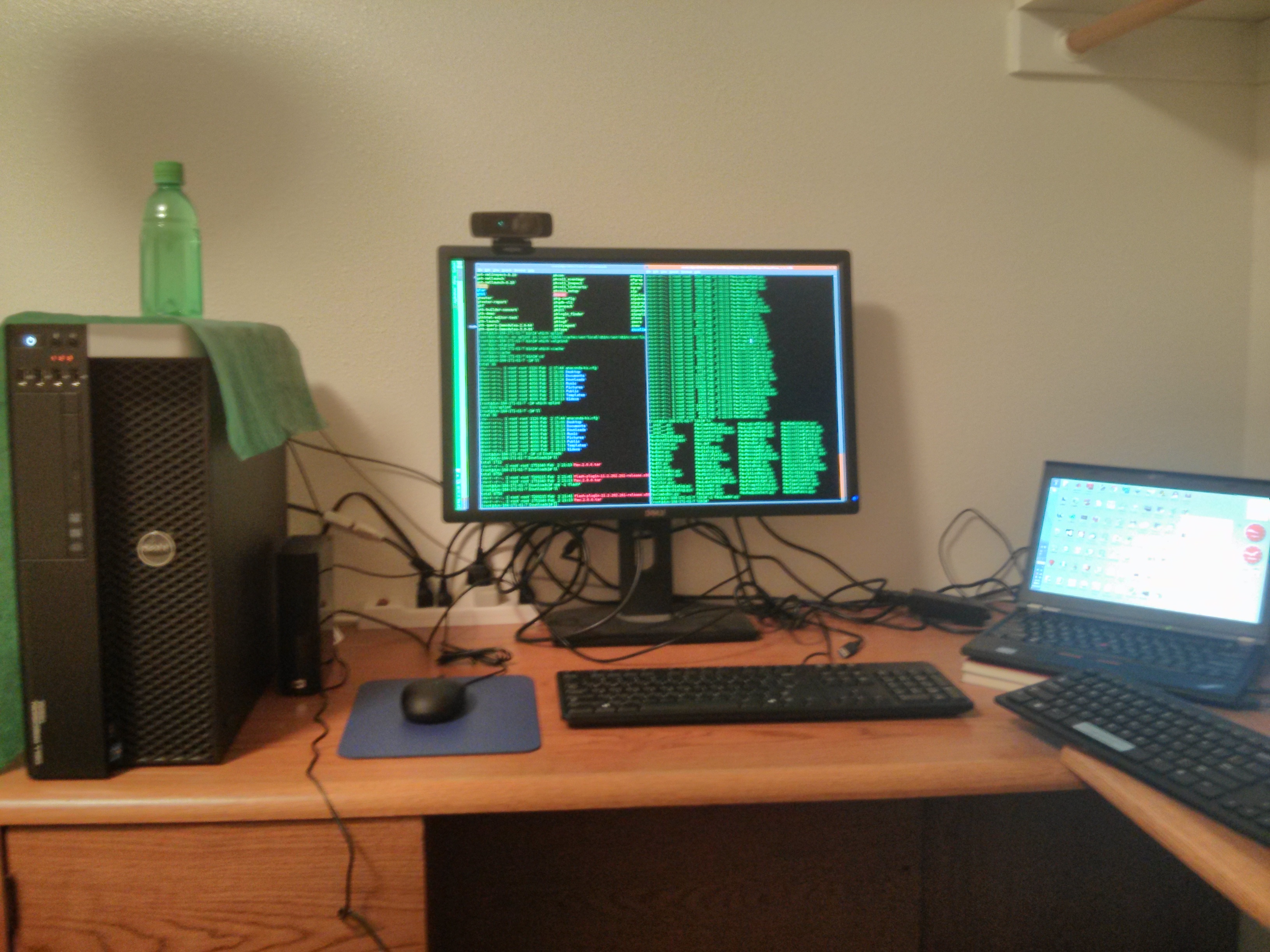
An introduction to my recently constructed  Linux workstation:

WORKSTATION: Dell Precision T5600
MONITOR: Dell UltraSharp 2412M
POWER: 825W
CPU: Intel Xeon E5-2609 4-core 2.40GHz (http://ark.intel.com/products/64588/Intel-Xeon-Processor-E5-2609-10M-Cache-2_40-GHz-6_40-GTs-Intel-QPI)
MEM: 8G ECC 1333MHz
GPU: 512M Nvidia NVS300
HD: 500G WD 7.2K XL500S
RAID: H310
DVD+/-rw: 8X Hitachi
OS: Fedora 18 (http://fedoraproject.org/)
DESKTOP: Mate (http://mate-desktop.org/)

Actually, there is not big difference between a workstation and a PC. However, there is something making them different, like the architecture of box, cooling system, CPU, GPU and memory. Anyway, I have chosen Dell Precision T5600 to be my base station. If you are a fan, like myself, of RedHat Enterprise Linux, then Dell Precision TXXXX would be a good choice as all their hardware are certified by RHEL5 workstation. That was the reason why I removed the pre-installed Win 7 and installed RHEL 6 server. Nevertheless, it would a nightmare if you do NOT subscribe to RHN(Red Hat Network, for sure, you have to pay…), which means you are unable to do any software upgrade using yum from the pkg repo directly. All I was trying to do is trying to resolve the dependency issue for certain RPM pkg or dealing with 64-bit issues. After all the struggle, I gave it up and switched to Fedora 18.

Yes, Fedora is sponsored by RedHat and internally compatible with RHEL and CentOS. Eventually, CentOS would be a great choice too. Well then, the most frustrating thing in Fedora 18 should be Gnome 3! I am not sure if there would be fans of Gnome 3 but I am pretty sure that I hate Gnome 3. There are reasons why Linux is called Linux instead of Mac OS and there are reasons why people would prefer to Linux instead of Mac OS. However, Gnome 3 has totally forgotten the reasons and made itself be Mac OS. This is silly and unacceptable even the stupid desktop is running on Linux kernel instead of Darwin. With enough disappointment, I switched to Cinnamon, which is the main desktop used by Linux Mint. Frankly, this desktop reminds me my deleted Win7. Still, I do not like it. After some search, I have finally found the desktop I want – Mate. Mate is a branch of Gnome 2 (the same as Cinnamon) but trying to keep the old style of traditional Gnome Linux style.

Anyway, I am satisfied with the software upgrade tool provided by Fedora. I could find most of the tools I need within the software, like R, Python, Ruby, Jython, Jruby, RStudio, SPE, Eric…Moreover, Mate allows you to control and customize your desktop as before without bothering ‘Universal Access’ stuffs. There are some hints for my experience playing with Fedora 18.

1. VMware Player
Kernel Header’s missing for latest Linux kernel like 3.7? (https://ask.fedoraproject.org/question/3485/vmware-player-f18-kernel-headers)
cp /usr/include/linux/version.h /lib/modules/3.7.2-**XXX**.fc18.x86_64/build/include/linux/

2. mpg123 vs. mpg321
mpg123 just won’t work for me. For the workaround, I use mpg321 and it works. Note: you need to install the corresponding libs based on the configure’s output and set the right LD_LIBRARY_PATH

Posted in Linux Distro | Tagged , , , , , | Leave a comment

Pointer in Python

There is no pointers in Python but there are pointers in Python indeed. Among different kinds of pointer implementation in Python, this post demonstrate an elegant way to use pointers, especially object pointers when doing Python OOP. Detailed ‘ctypes’ module of Python could be found: http://docs.python.org/2/library/ctypes.html#module-ctypes

Output:

*** Remote Interpreter Reinitialized  ***
>>>
node: name=a, number=-1, next=null
node: name=not a, number=1, next=b
node: name=func a, number=0, next=func b
None
None
(py_object(<NULL>), <__main__.LP_py_object object at 0x000000000265D648>)
(py_object(<__main__.Node object at 0x000000000266D2E8>), <__main__.LP_py_object object at 0x000000000265D648>)
node: name=not null now, number=-1, next=null
>>>

Source:

#——————————————————————————-
# Name:        pointerTry.py
# Purpose:     (Object) Pointer usage investigation/demonstraion in Python
#
# Author:      daveti
# Email:       daveti@cs.uoregon.edu
# Blog:        http://daveti.blog.com
#
# Created:     27/01/2013
# Copyright:   (c) daveti 2013
# Licence:     GNU/GPLv3
#——————————————————————————-

import ctypes

class Node(object):
    “Example class in Python OOP”
    def __init__(self, x):
        self.name = x
        self.number = -1
        self.next = None

    def __str__(self):
        return(‘node: name=%s, number=%d, next=%s’
                %(self.name, self.number,
                self.next.name if self.next != None else ‘null’))

def changeViaPointer(ptr):
    “Change the class Node member via ptr”
    ptr.contents.value.name = ‘func a’
    ptr.contents.value.number = 0
    ptr.contents.value.next = Node(‘func b’)

def main():
    “Demonstration for Python pointer operation”
    a = Node(‘a’)
    b = ctypes.py_object(a)
    c = ctypes.pointer(b)
    print(a)

    # Change the class member via pointer
    c.contents.value.name = ‘not a’
    c.contents.value.number = 1
    c.contents.value.next = Node(‘b’)
    print(a)

    # Change the class member via function call
    changeViaPointer(c)
    print(a)

    # What about ‘None’ object pointer?
    d = None
    e = ctypes.py_object(d)
    f = ctypes.pointer(e)
    print(d)
    f.contents.value = Node(‘not None now’)
    print(d)
    # NOT WORKING!

    # The correct ‘None’ pointer usage
    g = ctypes.py_object()
    h = ctypes.pointer(g)
    print(g, h)
    h.contents.value = Node(‘not null now’)
    print(g, h)
    i = g.value
    print(i)

if __name__ == ‘__main__’:
    main()

Posted in Programming | Tagged , , | Leave a comment

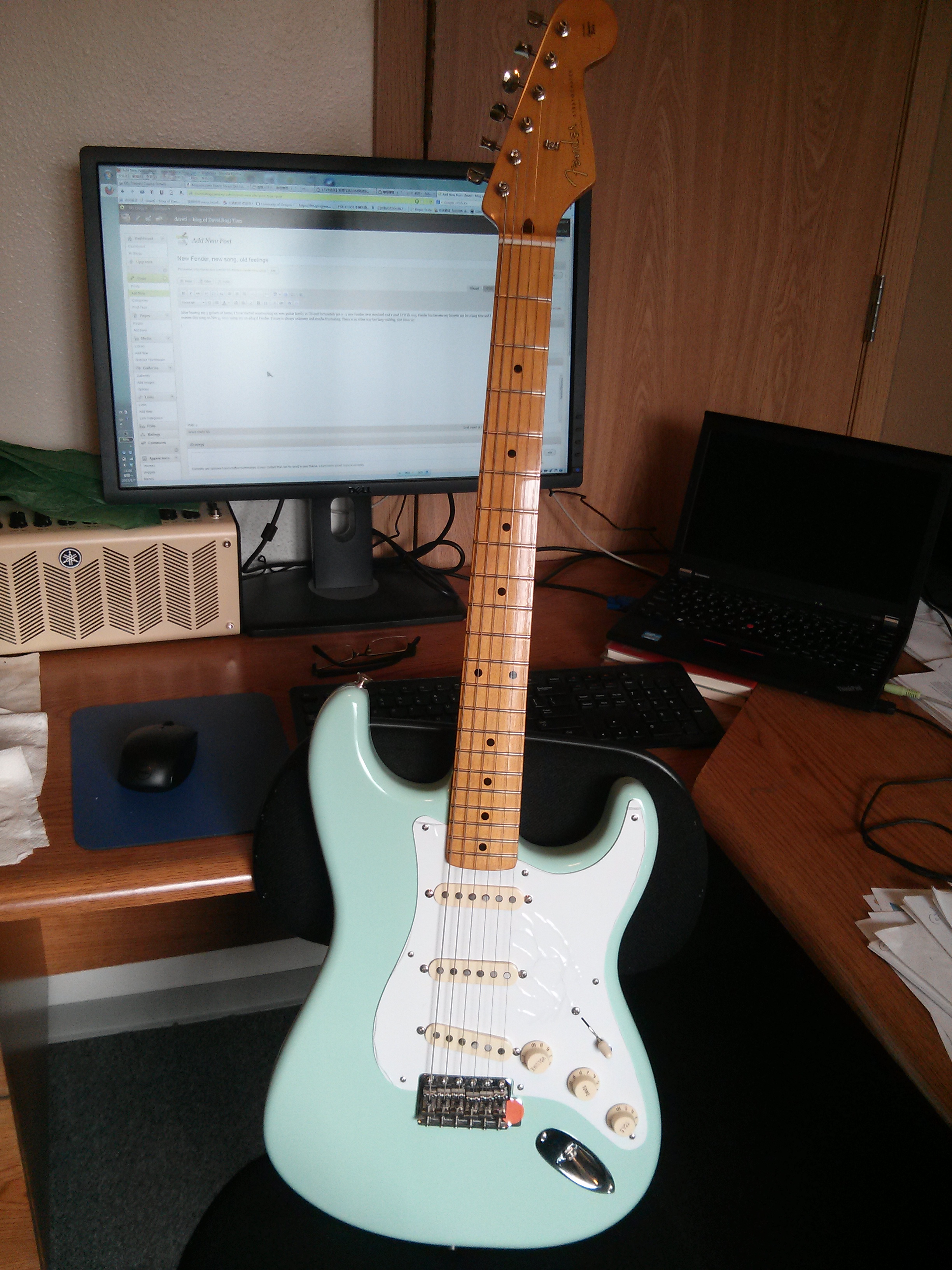
New Fender, new song, old feelings

After leaving my 3 guitars at home, I have started constructing my new guitar family in US and fortunately got 2 – a new Fender strat standard and a used LTD kh-203. Fender has become my favorite not for a long time and I worote this song on Nov 5, 2012 using my un-plug’d Fender. Future is always unknown and maybe frustrating. There is no other way but keep walking. God bless us!

fenderAgain

Name: Last night
Originated: daveti
Tune: E
Date: Nov 5, 2012
Rhythm: daveti
Vocal: daveti
Synthesize: daveti
Equipment: Fender strat standard, Internal mac of ThinkPad x230
Software: Java Sound Demo, Foobar 2000
Tab: E-A E-A B-A-E B-A-E
Note: A(E style with 6th fret), B(E style with 8th fret)
Lyric:
那天晚上
有些忧伤
躺在床上
不知去向
我总在想
未来
会是怎样
[audio:http://daveti.blog.com/files/2013/01/lastNight_11052012_daveti.mp3|titles=lastNight_11052012_daveti]
Posted in Music Prose | Tagged | Leave a comment

Jython – Combination of Java and Python

This post is used for final project of CIS610 – Teaching Effectiveness in CIS dept at UO, dedicated to the students with background of CIS122 – Intro to Algorithms and Problem Solving Using Python. Background of Java is not mandatory but would be helpful for writing Jython code in Java. Any comments please email: [daveti@cs.uoregon.edu] May it help:)

1. What is Jython?

Literally, Jython means Java + Python, which means writing Python code using Java code or writing Java code in Pythonic style (Python syntax). However, it is much more than that and we will see it later. Generally speaking, Jython is a kind of dynamic scripting languages, like Python or Ruby. Further more, it has the same syntax of Python, like using ‘:’ and indentation to stand for block instead of ‘{}’. Technically speaking, Jython is another kind of JVM-based languages, like Scala or Groovy. Essentially, in a word, Jython is scripting language running on JVM with Python syntax and library support from both Java and Python.

2. Jython interpreter/compiler

As Python, Jython has its interpreter to do interactive programming and compiler to compile and run the Jython source file, though the interpreter and compiler are integrated as one binary. As Jython itself is written in Java and Python and is JVM-based, the Jython interpreter/compiler is a big jar file running on JVM actually, named ‘jython.jar’, no matter ‘jython.sh’ under Unix/Linux or ‘jython.bat’ under Win/Dos is executed, interpreting and compiling the Jython code into bytecode running on this JVM.

3. Architecture of Jython

4.0 Key features of Jython

In the following paragraphs, we will try to go through the most key features of Jython, through which we could understand the reason why Jython was created and why it is so powerful and popular, as well as its limitation. We will give at least one example for each key feature helping understand without going deep into the implementation of these features of Jython. NOTE: all the examples are using compiler mode of Jython with source files instead of interpreter mode to make it more clear. However, the 2 modes are equivalent! All the example codes below could be downloaded from http://ix.cs.uoregon.edu/~daveti/jythonEx/

4.1 Writing Java like Python

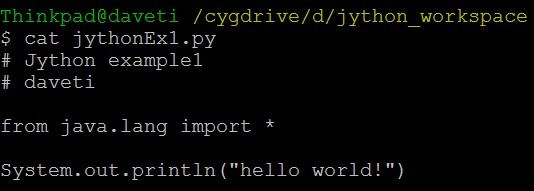
If you are familiar with both Java and Python, then the most probable language you hate (at least I hate:) between the 2 would be Java. Why? And the most probable reasons (at least for me:) would be the redundant syntax (please recall how many lines of code you need to print the stupid ‘hello world!’) and no scripting support (though we have many other JVM-based scripting languages). Check the ‘hello world’ below, does it look better comparing with original Java version?

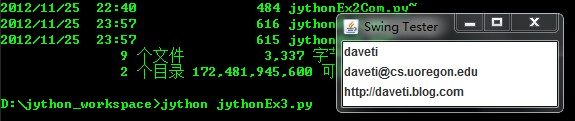
A complex example below involves Java GUI programming with Pythonic coding style – Python syntax.

4.2 Writing Jython as Python

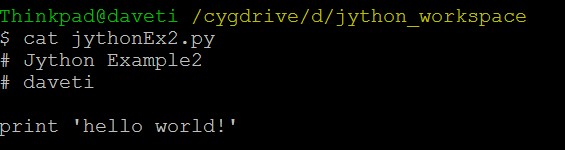
Actually, you will find all the source files of Jython have the same suffix as Python source files, with the format ‘*.py’. This is not coincidence but provides us the ability to write Jython as Python, as well as compiling Jython using Python interpreter/compiler, which will be mentioned later. Check the new Pythonic style of ‘hello world’. Feel free to wonder if this Jython or Python:)

A complex example below defines a new class inherited from ‘dictionary’ in Python and adds some new methods.

4.3 Writing Jython calling/using Java and Python

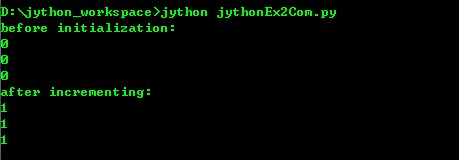
If you were asking what is the essential feature/ability of Jython, from my personal point of view, this is – the combination of Java and Python into Jython. The example below defines a function called ‘swingTest()’, which creates a Java Swing window using javax.swing,  and converts the Python ‘list’ into the content of the Java ‘Panel’.

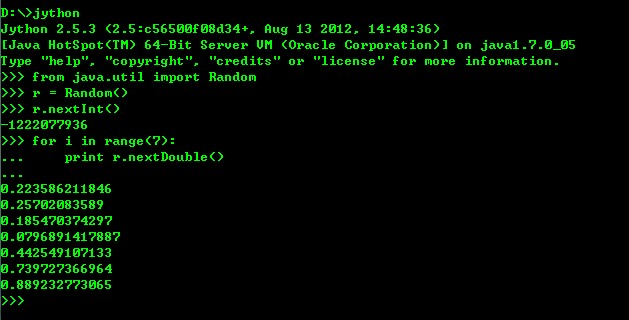
The other example is the interactive mode of Jython using interpreter, just like using Python interpreter:

4.4 Writing Java calling/using Jython/Python

According to the Jython user guide, there are 2 ways to accomplish this job, using org.python.core pkg or Java JSR 223 pkg. Both ways need the classpath to include your ‘jython.jar’ file, which contains both the 2 pkgs. Before starting, we will give a simple Jython/Python script and run it using Jython compiler.

First, we will use org.python.core pkg provided by Jython itself. We will give the Java code and run it using JVM.

Second, we will use Java JSR 223 which is also contained in Jython itself.

5. Writing Python calling/using Java (Optional)

Actually, this is not part of Jython. The only reason we put it here is to complete the connection between Java and Python and we will NOT provide detailed code examples for this part. Generally, there 2 popular Python pkgs providing us such an ability – writing Python calling Java: ‘Jpype’ and ‘Py4J’. Detailed info please refer to ‘9. Reference’. Moreover, ‘Jpype’ seems only support older version of Python, like Python 2.6 and is not updated for long (the latest version is from 2011). Because of these, ‘Py4J’ may be a better choice.

6. Performance of Jython

If you were worried about the performance about Jython, then you were asking the performance of JVM eventually. Comparing with the running time, the parsing, compiling time of Jython, which is from Jython/Python code to Java bytecode, is trivial. Then the real performance issue, like we mentioned above, is laying on JVM itself. The challenge for JVM is non-trivial but…especially concerning the improving JIT compiler and garbage collector within JVM. In a word, you could always try to write certain part of your code in Java (hoping to get better performance, which is mostly rely on JVM) and then integrate that part into your Jython script.

7. Limitations of Jython

The reason we could write Python code using the basic data structure, like list or dictionary, and almost all the standard pkgs of Python, like sys, shutil, date, is that Jython has provided us these Python features in pre-compiled/implemented Java class files, which are bytecode, already. However, for Python’s extension, like 3rd-party cool pkgs, we can do nothing at all in Jython. Though Jython has the ability to access all kinds of Java libraries, it is true that its Python ability is always far behind Python.

8. Hints

If you are using the Chinese version OS, whose encoding system may be ‘GBxxxxx’, then your Jython is not compatible with this encoding. You need to change the encoding to ‘UTF-8’, either via Jython interpreter, JVM start-up options or registry file under Jython installation directory. Detailed procedure please refer to the link: http://cpaul.is-programmer.com/posts/15226.html

9. Reference

http://en.wikipedia.org/wiki/Jython
http://www.jython.org/
http://wiki.python.org/jython/UserGuide
http://www.developerfusion.com/article/84299/java-in-a-python-body/
http://stackoverflow.com/questions/3652554/calling-java-from-python
http://jpype.sourceforge.net/
http://py4j.sourceforge.net/index.html

Posted in Programming | Tagged , , , , | 1 Comment

tmt – Tomcat monitor tool

Our Tomcat server sometimes crushes either process killed or no response from httpd. Before falling into the ‘long-term’ debugging, we have implemented ‘tmt’, which is used to moniter the status of Tomcat process and httpd by restarting the Tomcat timely. In ‘tmt’, we will learn the use of cronjob, ps, ulimit, coredump and curl/wget respectively and the combination of these tools to construct a simple but practical script – ‘tmt’. May it help:)

1. cronjob: basic framework for system monitoring under Unix/Linux
[root@aimlab ~]# crontab -l
*/1 * * * * /home/daveti/aimlab.cron
[root@aimlab ~]# crontab -e

2. coredump: useful way for debugging application/process written in C/C++
If you are wondering why the coredump is not generated or where the coredump is generated, please read on. Generally, whether coredump is enabled or not depends on ‘ulimit’. The name pattern and directory of coredump depend on ‘/proc/sys/kernel/core_pattern’ and ‘/proc/sys/kernel/core_uses_pid’. Detailed info please refer to the kernel document for ‘sysctl’: http://www.kernel.org/doc/Documentation/sysctl/kernel.txt

[daveti@aimlab ~]$ ulimit -a
core file size          (blocks, -c) 0
data seg size           (kbytes, -d) unlimited
scheduling priority             (-e) 0
file size               (blocks, -f) unlimited
pending signals                 (-i) 71680
max locked memory       (kbytes, -l) 32
max memory size         (kbytes, -m) unlimited
open files                      (-n) 1024
pipe size            (512 bytes, -p) 8
POSIX message queues     (bytes, -q) 819200
real-time priority              (-r) 0
stack size              (kbytes, -s) 10240
cpu time               (seconds, -t) unlimited
max user processes              (-u) 71680
virtual memory          (kbytes, -v) unlimited
file locks                      (-x) unlimited
[daveti@aimlab ~]$ ulimit -c unlimited
[daveti@aimlab ~]$ ulimit -a
core file size          (blocks, -c) unlimited
data seg size           (kbytes, -d) unlimited
scheduling priority             (-e) 0
file size               (blocks, -f) unlimited
pending signals                 (-i) 71680
max locked memory       (kbytes, -l) 32
max memory size         (kbytes, -m) unlimited
open files                      (-n) 1024
pipe size            (512 bytes, -p) 8
POSIX message queues     (bytes, -q) 819200
real-time priority              (-r) 0
stack size              (kbytes, -s) 10240
cpu time               (seconds, -t) unlimited
max user processes              (-u) 71680
virtual memory          (kbytes, -v) unlimited
file locks                      (-x) unlimited
[daveti@aimlab ~]$ cat /proc/sys/kernel/core_pattern
core
[daveti@aimlab ~]$ cat /proc/sys/kernel/core_uses_pid
1
[daveti@aimlab ~]$ cd Ctest
[daveti@aimlab Ctest]$ ll
total 120
drwxrwxr-x 2 daveti daveti   4096 Nov  6 13:18 .
drwx—— 9 daveti daveti   4096 Nov  9 14:40 ..
-rw——- 1 daveti daveti 159744 Nov  6 13:18 core.4530
-rwxrwxr-x 1 daveti daveti   6575 Nov  6 13:17 coreTry
-rw-rw-r– 1 daveti daveti    117 Nov  6 13:17 coreTry.c
[daveti@aimlab Ctest]$

3. curl/wget: easy command to detect the response from httpd
Both ‘curl’ and ‘wget’ are commands used to send HTTP HEAD request to ‘httpd’ and to get the corresponding response, through which the status of httpd could be determined then. There may be the case where the process of Tomcat is still alive but the ‘httpd’ is hung somewhere. In this case, the 2 commands could help.

[daveti@aimlab ~]$ curl -I http://daveti.blog.com
HTTP/1.1 200 OK
Server: nginx/0.7.67
Date: Fri, 09 Nov 2012 22:56:08 GMT
Content-Type: text/html; charset=UTF-8
Connection: keep-alive
Vary: Accept-Encoding
X-Powered-By: PHP/5.3.6
X-UA-Compatible: IE=edge
X-Pingback: http://daveti.blog.com/xmlrpc.php
Content-Length: 249424
X-Varnish: 224924436
Age: 0
Via: 1.1 varnish

[daveti@aimlab ~]$ wget -S –spider daveti.blog.com
Spider mode enabled. Check if remote file exists.
–2012-11-09 14:56:49–  http://daveti.blog.com/
Resolving daveti.blog.com… 195.170.168.1
Connecting to daveti.blog.com|195.170.168.1|:80… connected.
HTTP request sent, awaiting response…
HTTP/1.1 200 OK
Server: nginx/0.7.67
Date: Fri, 09 Nov 2012 22:56:49 GMT
Content-Type: text/html; charset=UTF-8
Connection: keep-alive
Vary: Accept-Encoding
X-Powered-By: PHP/5.3.6
X-UA-Compatible: IE=edge
X-Pingback: http://daveti.blog.com/xmlrpc.php
Content-Length: 249424
X-Varnish: 224928456 224924436
Age: 41
Via: 1.1 varnish
Length: 249424 (244K) [text/html]
Remote file exists and could contain further links,
but recursion is disabled — not retrieving.

[daveti@aimlab ~]$

4. tmt – Tomcat monitor tool

#!/bin/bash
# cron table used to detect if the apache server process
# is still alive. If alive, then leave it; otherwise
# will restart the server process again
# NOTE: this is a workaround for segV in JVM/Apache…
# Sep 18, 2012
# daveti

# Enable core dump for debugging
# ulimit -c ulimit
# Nov 5th, 2012
# daveti

# Add httpd checking if the process is still alive
# but no response from httpd
# curl or wget
# Nov 7th, 2012
# daveti

# Define the process name for apache server
export AIMAPACHE=”/usr/lib/jvm/java-7-sun/bin/java -Djava.util.logging.config.file=/usr/apache-tomcat-7.0.26/conf/logging.properties -Djava.util.logging.manager=org.apache.juli.ClassLoaderLogManager -Djava.endorsed.dirs=/usr/apache-tomcat-7.0.26/endorsed -classpath /usr/apache-tomcat-7.0.26/bin/bootstrap.jar:/usr/apache-tomcat-7.0.26/bin/tomcat-juli.jar -Dcatalina.base=/usr/apache-tomcat-7.0.26 -Dcatalina.home=/usr/apache-tomcat-7.0.26 -Djava.io.tmpdir=/usr/apache-tomcat-7.0.26/temp org.apache.catalina.startup.Bootstrap start”
export MYHOME=”/home/daveti”
# Define the boolean flag to see if the apache server is alive
export ALIVE=”false”
# Check for the response from http if the tomcat process is there
export SERVERURL=”http://aimlab.cs.uoregon.edu&#8221;
export AIMHTTP=”HTTP/1.1 200 OK”
# Try to get the corresponding process…
date > $MYHOME/aimlab.tmp
ps -eo args | grep “org.apache.catalina.startup.Bootstrap start” >> $MYHOME/aimlab.tmp

# Make sure this is the process of apache
while read line
do
if [ “$line” == “$AIMAPACHE” ]
then
ALIVE=”true”
fi
done < $MYHOME/aimlab.tmp

# Check the flag to see if we need to restart apache manually
if [ “$ALIVE” == “false” ]
then
# Save the time of restarting apache…
date >> $MYHOME/aimlab_apache_restart.log
echo “Tomcat process(JVM) got core dump” >> $MYHOME/aimlab_apache_restart.log
# Enable core dump before each restart for further debugging
ulimit -c unlimited
ulimit -a >> $MYHOME/aimlab_apache_restart.log
# Check for the current directory
echo $PWD >> $MYHOME/aimlab_apache_restart.log
# NOTE; this log is used just for debugging to see the frequency
# of crush of apache – the log may need to be deleted if it is too large…
# Restart the server
/usr/apache-tomcat-7.0.26/bin/restart.sh >> /usr/apache-tomcat-7.0.26/logs/cron_restart.log
echo “=================================” >> $MYHOME/aimlab_apache_restart.log
else
# NOTE: the httpd test should not be executed if we have already restarted the tomcat process
# On the other hand, the httpd test should only happen when the process is still alive
# Send http HEAD request
curl -I $SERVERURL >> $MYHOME/aimlab.tmp
# Get the first line of response
# NOTE: need to truncate the extra newline and control characters at the tail
HTTP200OK=`cat $MYHOME/aimlab.tmp | grep “$AIMHTTP” | tr -d nr[:cntrl:]`
# Debug
echo $HTTP200OK >> $MYHOME/aimlab.tmp
echo $AIMHTTP >> $MYHOME/aimlab.tmp
# Restart the tomcat again if bad response from httpd
if [ “$HTTP200OK” != “$AIMHTTP” ]
then
# Debug
echo “NOT 200 OK?” >> $MYHOME/aimlab.tmp
echo $HTTP200OK >> $MYHOME/aimlab.tmp
echo $AIMHTTP >> $MYHOME/aimlab.tmp
# Restart the tomcat
date >> $MYHOME/aimlab_apache_restart.log
echo “Bad http HEAD response from httpd” >> $MYHOME/aimlab_apache_restart.log
curl -I $SERVERURL >> $MYHOME/aimlab_apache_restart.log
/usr/apache-tomcat-7.0.26/bin/restart.sh >> /usr/apache-tomcat-7.0.26/logs/cron_restart.log
echo “=================================” >> $MYHOME/aimlab_apached_restart.log
fi
fi

Posted in Dave's Tools, Programming | Tagged , , , , , , , , , | 1 Comment

jop – Jena Owl Parser

Jena API may be the first choice for building Semantic Web applications using Java – parsing RDF and OWL. However, the official Jena document for ontology API (http://jena.apache.org/documentation/ontology/) seems kind of unfriendly with mixing parser and writer part altogether. ‘jop’ is provided then to show how to use Jena Ontology API to parse the complete element in OWL. Note: ‘jop’ is only a demonstration file (full of static methods) instead of a serious parser!

Project Name: jop
Destination: Jena Owl Parser
Language: Java
IDE: NetBeans 7.2
Library: Jena API 2.7
Project Web: http://github.com/daveti/jop
Git Read Only: https://github.com/daveti/jop.git
Source file: https://github.com/daveti/jop/blob/master/src/jop/Jop.java
Output: https://github.com/daveti/jop/blob/master/test/camera.owl.jop.output
Example OWL file: http://aimlab.cs.uoregon.edu/OntoEvaluator/camera.owl
Marked analysis: https://github.com/daveti/jop/blob/master/test/camera.owl.job.analysis

Posted in AI/ML, Dave's Tools | Tagged , , , | Leave a comment

NLTK – install nltk for Python2.7 on 64-bit win 7

There are some tricky stuffs if you are planning to install nltk for your Python2.7 (Note, only Python 2.x is supported right now) on 64-bit win7 system. Generally, all these awkward trouble are caused by stupid windows installer, which may be designed for 32-bit system regardless of 64-bit case. Here comes my experience for installing nltk pkg for my Python2.7 on my 64-bit win7 system.

1. General procedure from nltk.org (you will find this is not gonna work…but for reference it is good)

http://nltk.org/install.html

2. Python2.7 is not in the registry?

http://stackoverflow.com/questions/3652625/installing-setuptools-on-64-bit-windows

3. Get the 64-bit numpy

http://www.lfd.uci.edu/~gohlke/pythonlibs/#numpy (BTW, this site is also a great repository for all unofficial python libs)

4. Get the 64-bit pypi installed (http://pypi.python.org/pypi/setuptools)

http://peak.telecommunity.com/dist/ez_setup.py

Move this ez_setup.py under your Python27scripts and run this ez_setup.py. You will then get the easy_install.exe, which is mentioned in nltk.org. And now, run ‘pip install pyyaml nltk

5. Get the extra PyLib?

http://matplotlib.org/

There may be warning complaining missing PyLib when you try ‘import nltk’ and ‘help(nltk)’ – no problem, let us make it right.

Posted in AI/ML, IDE_Make | Tagged , , , , , | Leave a comment

Python learning – Sieve of Eratosthenes

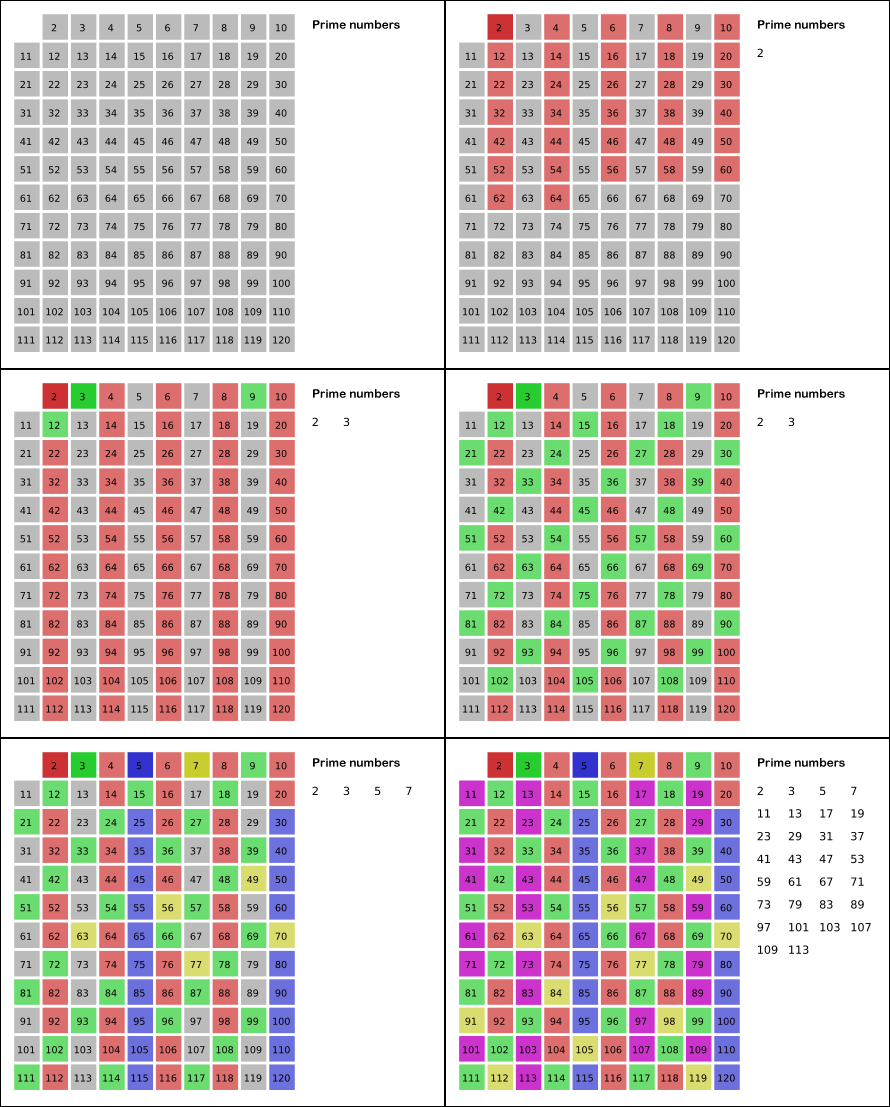
Get all the information about ‘Sieve of Eratosthenes’ on wikipedia (http://en.wikipedia.org/wiki/Sieve_of_Eratosthenes). This algorithm does tell us there should be some algorithms with better time complexcity or space complexcity. Fun!

(pic took from Wikipedia)

[daveti@aimlab python]$ cat sea.py
#!/bin/env python
# Sieve of Eratosthenes Algorithm – sea
# Refernce: http://en.wikipedia.org/wiki/Sieve_of_Eratosthenes
# Input: range of number
# Output: all primes within the range
# 27SEP2012
# daveti

import math

print (“Input the range of number:”)
maxNum=int(input())

# 0 and 1 are NOT primes
isPrimeList=[ False, False]
for i in range(2, maxNum+1):
    # Init the full list with True
    isPrimeList.append(True)

for j in range(2, int(math.ceil(math.sqrt(maxNum)))):
    if isPrimeList[ j] == True:
        for k in range(j*j,(maxNum+1),j):
            isPrimeList[ k] = False

# Format and print all the primes
print (“Output all the primes numbers:”)
lineList = []
numOfPrimesPerLine = 20
for m in range(maxNum+1):
    if numOfPrimesPerLine == len(lineList):
        print(lineList)
        lineList = []
    if isPrimeList[ m] == True:
        lineList.append( m)

if len(lineList) != 0:
    # Need to print the last line
    print(lineList)
[daveti@aimlab python]$ ./sea.py
Input the range of number:
1000
Output all the primes numbers:
[2, 3, 5, 7, 11, 13, 17, 19, 23, 29, 31, 37, 41, 43, 47, 53, 59, 61, 67, 71]
[73, 79, 83, 89, 97, 101, 103, 107, 109, 113, 127, 131, 137, 139, 149, 151, 157, 163, 167, 173]
[179, 181, 191, 193, 197, 199, 211, 223, 227, 229, 233, 239, 241, 251, 257, 263, 269, 271, 277, 281]
[283, 293, 307, 311, 313, 317, 331, 337, 347, 349, 353, 359, 367, 373, 379, 383, 389, 397, 401, 409]
[419, 421, 431, 433, 439, 443, 449, 457, 461, 463, 467, 479, 487, 491, 499, 503, 509, 521, 523, 541]
[547, 557, 563, 569, 571, 577, 587, 593, 599, 601, 607, 613, 617, 619, 631, 641, 643, 647, 653, 659]
[661, 673, 677, 683, 691, 701, 709, 719, 727, 733, 739, 743, 751, 757, 761, 769, 773, 787, 797, 809]
[811, 821, 823, 827, 829, 839, 853, 857, 859, 863, 877, 881, 883, 887, 907, 911, 919, 929, 937, 941]
[947, 953, 967, 971, 977, 983, 991, 997]
[daveti@aimlab python]$

Posted in Programming | Tagged , , | Leave a comment

Python learning – Caesar Cipher

Get all the information about the old, famous and interesing Caesar Cipher (http://en.wikipedia.org/wiki/Caeser_cipher). In this post we will implement the Caeser Cipher Encoder (cce.py), Caeser Cipher Decoder (ccd.py) and Caeser Cipher Brute Force Decipher (ccbfd.py). Have FUN:) (BTW, I have suddenly realized that I have some typos in source code – Caeser should be Caesar…my bad:(

[daveti@aimlab python]$ cat cce.py
#!/bin/env python
# Caeser Cipher Ecoder – cce
# Input: original text and shift code
# Output: ciphered text
# 24SEP2012
# daveti

print (“Input the original text:”)
originalText = input()
print (“Input the shift code:”)
shiftCode = int(input())

originalText = originalText.upper()
cipheredText = ”
for i in range(len(originalText)):
    if originalText[ i].isalpha() == True:
        ordNum = ord(originalText[ i])+shiftCode
        if ordNum > ord(‘Z’):
            ordNum = ordNum – ord(‘Z’) + ord(‘A’) – 1
        cipheredText += chr(ordNum)
    else:
        # Do nothing
        cipheredText += originalText[ i]

print (“Output the ciphered text: ” + cipheredText)
[daveti@aimlab python]$ ./cce.py
Input the original text:
‘what is the hell?’
Input the shift code:
7
Output the ciphered text: DOHA PZ AOL OLSS?
[daveti@aimlab python]$ cat ccd.py
#!/bin/env python
# Caeser Cipher Decoder – ccd
# Input: ciphered text and shift code
# Output: original text
# 24SEP2012
# daveti

print (“Input the ciphered text:”)
cipheredText = input()
print (“Input the shift code:”)
shiftCode = int(input())

cipheredText = cipheredText.upper()
originalText = ”
for i in range(len(cipheredText)):
    if cipheredText[ i].isalpha() == True:
        ordNum = ord(cipheredText[ i])-shiftCode
        if ordNum < ord(‘A’):
            ordNum = ord(‘Z’) + 1 – (ord(‘A’) – ordNum)
        originalText += chr(ordNum)
    else:
        # Do nothing
        originalText += cipheredText[ i]

print (“Output the original text: ” + originalText)
[daveti@aimlab python]$ ./ccd.py
Input the ciphered text:
‘DOHA PZ AOL OLSS?’
Input the shift code:
7
Output the original text: WHAT IS THE HELL?
[daveti@aimlab python]$ cat ccbfd.py
#!/bin/env python
# Caeser Cipher Brute Force Decipher – ccbfd
# Input: ciphered text
# Output: original text with maximal possibility
# 25SEP2012
# daveti

# Letter frequency list (from A to Z)
letterGoodness = [ .0817, .0149, .0278, .0425, .1270, .0223, .0202, .0609, .0697,
                    .0015, .0077, .0402, .0241, .0675, .0751, .0913, .0009, .0599,
                    .0633, .0906, .0276, .0098, .0236, .0015, .0197, .0007 ]

# Assume the right input without error checking…
def computeGoodness(text):
    goodness = .0
    for i in range(len(text)):
        if text[i].isalpha() == True:
            goodness += letterGoodness[ord(text[i])-ord(‘A’)]
    return goodness

# Save all the possible decodings based on shiftCode
originalTextList = []
originalText = ”
# Save all the goodness for all the possible shiftCode
goodnessList = []
goodness = .0

print (“Input the ciphered text:”)
cipheredText = input()
cipheredText = cipheredText.upper()
lenOfCipheredText = len(cipheredText)

# i is shiftCode
for i in range(26):
    # Init the originalText each time
    originalText = ”
    for j in range(lenOfCipheredText):
        if cipheredText[ j].isalpha() == True:
            ordNum = ord(cipheredText[ j])-i
            if ordNum < ord(‘A’):
                ordNum = ord(‘Z’) + 1 – (ord(‘A’) – ordNum)
            originalText += chr(ordNum)
        else:
            # Do nothing
            originalText += cipheredText[ j]
    # Add this text into the list
    originalTextList.append(originalText)
    # Comput the goodness for this text and add into the list
    goodness = computeGoodness(originalText)
    goodnessList.append(goodness)
    # Debug options
    #print (‘DEBUG: shiftCode: ‘, i)
    #print (‘DEBUG: originalText: ‘, originalText)
    #print (‘DEBUG: goodness: ‘, goodness)

# Debug option
#print (‘DEBUG: goodnessList: ‘, goodnessList)
# Get the index of maximal value
maxIndex = 0
maxGoodness = .0
for k in range(len(goodnessList)):
    if goodnessList[ k] >= maxGoodness:
        maxGoodness = goodnessList[ k]
        maxIndex = k
# Debug option
#print (‘DEBUG: maxIndex: ‘, maxIndex)
#print (‘DEBUG: maxGoodness: ‘, maxGoodness)
# Find the text with maximal goodness
decipheredText = originalTextList[maxIndex]

print (“Output the most possible original text: ” + decipheredText)
[daveti@aimlab python]$ ./ccbfd.py
Input the ciphered text:
‘DOHA PZ AOL OLSS?’
Output the most possible original text: WHAT IS THE HELL?
[daveti@aimlab python]$

Posted in Programming | Tagged , , , | Leave a comment