nex – Linux netlink programming for kernel and user spaces

There are ways to communicate with Linux kernel, including /proc, debugfs, syscall and etc. Most of them are unidirectional, from the kernel to the user space. /proc could be used to ‘write’ to the kernel but mostly in small data transmission. The most flexible and reliable bidirectional communication should be netlink. This post will talk about netlink programming both in the kernel and the user space, using real working examples – nex. K.R.K.C.

1. netlink programming in the user space

This may be the most common way to do netlink programming. ‘man 7 netlink’/’man netlink’ should give the details and the concrete examples. Eventually, from the user space, netlink is a special socket, which means all you need to do is socket() and bind(). As long as there is a target socket address, send()/recv() should work. NOTE: the socket() should like this ‘socket(PF_NETLINK, SOCK_DGRAM, NETLINK_ROUTE);’. PF_NETLINK is the one for netlink; only UDP/raw works for netlink for the transport type. As the kernel has defined a lot of messages/protocols used to communicate with, the 3rd parameter should be the number standing for that message/protocol, like NETLINK_ROUTE.

2. netlink programming in the user space

If a new message/protocol is needed to talk to the kernel, which means there would be a user-defined message/protocol used by both the kernel and the user-space application, then netlink programming in the kernel space is needed. All the essential thing here is netlink_kernel_create() once the message is determined. Within this kernel function, a callback API used to process the message has to be provided. Once there is a netlink message from the user space, the netlink socket within the kernel space will receive it and process it using the callback API. NOTE: in the latest version of Linux kernel (3.9/3.10), to create a netlink socket in the kernel, your could should look like below:

struct netlink_kernel_cfg cfg = {
.input = hello_nl_recv_msg,
};
nl_sk = netlink_kernel_create(&init_net, NETLINK_USER, &cfg);

 
But the older version (2.6/3.X) may look like this:

nl_sk = netlink_kernel_create(&init_net, NETLINK_USER, 0, hello_nl_recv_msg,
NULL, THIS_MODULE);

Project Name: nex
Destination: Linux netlink programming examples
Language: C
IDE: Vim
Library:
Project Web: https://github.com/daveti/nex
Git Read Only: https://github.com/daveti/nex.git

Posted in Dave's Tools, OS, Programming | Tagged , , | Leave a comment

Fxxk U, Blog.com – move to WordPress.com

blogdotcom

I have been suffered enough…from Blog.com! As a paid customer, my blog has been keeping down and down for days and there is no response from their support team. After recent 3-day down, I find my recent post is lost! So finally, Blog.com is beginning to get rid of customer’s post to get their overloaded server up again! Ridiculous? No, that is the truth. I spent the whole morning to export my blog from Blog.com and import it into WordPress.com. I have also paid $99 to promote my account there. Hope everything goes well here.

From now on, http://davejingtian.org is my new home and I will never ever update http://daveti.blog.com

K.R.K.C

-daveti

Posted in Uncategorized | Tagged | 2 Comments

Build official Debian linux kernel

Comparing with ‘normal’ Linux kernel build, the ‘official’ Linux kernel build for each distribution is confusing and awkward. Debian 7.1 Wheezy may be friendly but still needs cautions. The good thing is you do not need to patch the original kernel with the Debian patches yourself. Have fun!

1. Get the official Debian kernel source pkg

apt-get source linux

This cmd will download the corresponding Debian kernel source pkg based on your current `uname -r`. After download the pkg, Debian pkg management will install the pkg into /usr/src. Moreover, the Debian patches would be patched automatically, which may be the best thing for official kernel build!

debian:/usr/src# apt-get source linux
Reading package lists… Done
Building dependency tree
Reading state information… Done
NOTICE: ‘linux’ packaging is maintained in the ‘Svn’ version control system at:
svn://svn.debian.org/svn/kernel/dists/trunk/linux/
Need to get 69.2 MB of source archives.
Get:1 http://ftp.debian.org/debian/ wheezy/main linux 3.2.46-1 (dsc) [103 kB]
Get:2 http://ftp.debian.org/debian/ wheezy/main linux 3.2.46-1 (tar) [65.9 MB]
Get:3 http://ftp.debian.org/debian/ wheezy/main linux 3.2.46-1 (diff) [3,225 kB]
Fetched 69.2 MB in 6min 36s (175 kB/s)
gpgv: keyblock resource `/root/.gnupg/trustedkeys.gpg’: file open error
gpgv: Signature made Sat 08 Jun 2013 05:56:06 PM PDT using RSA key ID 95861109
gpgv: Can’t check signature: public key not found
dpkg-source: warning: failed to verify signature on ./linux_3.2.46-1.dsc
dpkg-source: info: extracting linux in linux-3.2.46
dpkg-source: info: unpacking linux_3.2.46.orig.tar.xz
dpkg-source: info: unpacking linux_3.2.46-1.debian.tar.xz
dpkg-source: info: applying debian/version.patch
dpkg-source: info: applying debian/kernelvariables.patch
dpkg-source: info: applying bugfix/all/kbuild-Fix-missing-n-for-NEW-symbols-in-yes-make-old.patch
dpkg-source: info: applying bugfix/x86/viafb-autoload-on-olpc-xo1.5-only.patch
dpkg-source: info: applying bugfix/all/cifs-fix-potential-buffer-overrun-when-composing-a-new-options.patch
debian:/usr/src#

debian:/usr/src# ll
total 67588
drwxr-xr-x 24 root root     4096 Jul 28 11:28 linux-3.2.46
-rw-r–r–  1 root root  3224676 Jun  8 18:56 linux_3.2.46-1.debian.tar.xz
-rw-r–r–  1 root root   103051 Jun  8 18:56 linux_3.2.46-1.dsc
-rw-r–r–  1 root root 65871748 Jun  8 18:56 linux_3.2.46.orig.tar.xz
debian:/usr/src#

2. Before you start the build, make sure you have some tools installed besides the ones needed by the ‘normal’ Linux kernel build…

apt-get install debhelper
apt-get install gcc-4.6
apt-get install xmlto
apt-get install filterdiff

3. Choose the arch for your machine and trigger the build only for that arch – to save time and storage!

fakeroot make -f debian/rules.gen setup_i386_none_686-pae
cd /usr/src/linux-3.2.46/debian/build/build_i386_none_686-pae
make menuconfig
cd ../../..
fakeroot make -f debian/rules.gen binary-arch_i386_none_686-pae binary-indep
DEBIAN_KERNEL_JOBS=${NR_CPUS}

debian:/usr/src# ll
total 349864
drwxr-xr-x 24 root root      4096 Jul 28 20:36 linux-3.2.46
-rw-r–r–  1 root root   3224676 Jun  8 18:56 linux_3.2.46-1.debian.tar.xz
-rw-r–r–  1 root root    103051 Jun  8 18:56 linux_3.2.46-1.dsc
-rw-r–r–  1 root root  65871748 Jun  8 18:56 linux_3.2.46.orig.tar.xz
-rw-r–r–  1 root root   6383274 Jul 29 11:50 linux-doc-3.2_3.2.46-1_all.deb
-rw-r–r–  1 root root    597596 Jul 29 11:00 linux-headers-3.2.0-4-686-pae_3.2.46-1_i386.deb
-rw-r–r–  1 root root  22920680 Jul 29 10:44 linux-image-3.2.0-4-686-pae_3.2.46-1_i386.deb
-rw-r–r–  1 root root 255994142 Jul 29 11:00 linux-image-3.2.0-4-686-pae-dbg_3.2.46-1_i386.deb
-rw-r–r–  1 root root   2942958 Jul 29 11:51 linux-manual-3.2_3.2.46-1_all.deb
-rw-r–r–  1 root root    200430 Jul 29 11:00 xen-linux-system-3.2.0-4-686-pae_3.2.46-1_i386.deb
debian:/usr/src#

4. Install the new kernel image and reboot the machine

dpkg -i linux-image-3.2.0-4-686-pae_3.2.46-1_i386.deb

debian:/usr/src# dpkg -i linux-image-3.2.0-4-686-pae_3.2.46-1_i386.deb
(Reading database … 184013 files and directories currently installed.)
Preparing to replace linux-image-3.2.0-4-686-pae 3.2.46-1 (using linux-image-3.2.0-4-686-pae_3.2.46-1_i386.deb) …
Unpacking replacement linux-image-3.2.0-4-686-pae …
Examining /etc/kernel/postrm.d .
run-parts: executing /etc/kernel/postrm.d/initramfs-tools 3.2.0-4-686-pae /boot/vmlinuz-3.2.0-4-686-pae
run-parts: executing /etc/kernel/postrm.d/zz-update-grub 3.2.0-4-686-pae /boot/vmlinuz-3.2.0-4-686-pae
Setting up linux-image-3.2.0-4-686-pae (3.2.46-1) …
Running depmod.
Examining /etc/kernel/postinst.d.
run-parts: executing /etc/kernel/postinst.d/initramfs-tools 3.2.0-4-686-pae /boot/vmlinuz-3.2.0-4-686-pae
update-initramfs: Generating /boot/initrd.img-3.2.0-4-686-pae
run-parts: executing /etc/kernel/postinst.d/pm-utils 3.2.0-4-686-pae /boot/vmlinuz-3.2.0-4-686-pae
run-parts: executing /etc/kernel/postinst.d/zz-update-grub 3.2.0-4-686-pae /boot/vmlinuz-3.2.0-4-686-pae
Generating grub.cfg …
Found background image: /usr/share/images/desktop-base/desktop-grub.png
Found linux image: /boot/vmlinuz-3.2.0-4-686-pae
Found initrd image: /boot/initrd.img-3.2.0-4-686-pae
done
debian:/usr/src#

5. Trigger new build with certain code changes by deleting the build timestamp

rm debian/stamps/build_i386_none_686-pae_plain

6. Reference

https://wiki.debian.org/HowToRebuildAnOfficialDebianKernelPackage

Posted in OS | Tagged , , , , , | 1 Comment

fsl – Fedora Security Lab

fsl (Fedora Security Lab) is a customized Fedora OS for security hack/test based Fedora 19. Like the famous BackTrace Linux, fsl has integrated a butch of security tools. To take the advantage of fsl, either security liveCD or all the security pkgs included in fsl is needed. For the later solution, a shell script – fsli (Fedora Security Lab Install) is written to ease the tedious job.

1. LiveCD

http://spins.fedoraproject.org/security/#downloads

2. yum (Fedora 19)

yum groupinstall security-lab

3. ansible (Fedora <19)

yum install ansible
wget https://git.fedorahosted.org/cgit/security-spin.git/plain/ansible-playbooks/fsl-packages.yml
ansible-playbook fsl-packages.yml -f 10

NOTE: hosts file may needs to configure…

4. fsli.sh (Fedora Any)

#!/bin/sh
# Fedora Security Lab Install
# daveti@cs.uoregon.edu
# http://daveti.blog.com
# Jul 19, 2013

# Clear the old one
FSLFILE=”availableApps?format=txt”
rm -rf “$FSLFILE” 2>&1 > /dev/null

# Get the txt file for fsl
FSLLINK=”https://fedorahosted.org/security-spin/wiki/availableApps?format=txt&#8221;
wget “$FSLLINK”
if [ ! -f “$FSLFILE” ]
then
        echo “fsl pkg file does not exists!”
        exit 1
fi

# Get the package name
while read line
do
        #echo “$line”
        STARTSYMBOL=`echo “$line” | cut -d” ” -f1 | tr -d ” “`
        #echo “$STARTSYMBOL”
        if [ “$STARTSYMBOL” == “*” ]
        then
                #echo “$STARTSYMBOL”
                PKGNAME=`echo “$line” | cut -d” ” -f3 | tr -d ” “`
                PKGNAME=`echo “$PKGNAME” | cut -d”]” -f1 | tr -d ” “`
                echo “$PKGNAME:”
                # Install the pkg
                yum -y install “$PKGNAME”
        fi
done < “$FSLFILE”

Posted in Dave's Tools, OS, Security | Tagged , , , , , | Leave a comment

Android 4.0 for x86 – Install Android 4.0 using KVM in your Linux

Thanks to the project Android-x86, now Android 4.0 is able to run in our PC stably. Just installed Android 4.0 in my Fedora 18 Linux using KVM – it is stable and cool! This post shares some key points for running Android in KVM. Have fun!

0. Android_x86

http://www.android-x86.org/

1. Get the ROM

http://code.google.com/p/android-x86/downloads/list
http://code.google.com/p/android-x86/downloads/detail?name=android-x86-4.2-20130228.iso&can=2&q=

2. KVM install for Ubuntu (works great for Fedora)

http://www.upubuntu.com/2012/03/how-to-install-android-x86-40-using.html

3. Hints

a. Choose the format of your virtual disk to be ‘raw’ instead of others.
b. Give the memory for your Android at least 2GB to accelerate the speed.

Posted in OS | Tagged , , , , | Leave a comment

relay – linux kernel relay filesystem

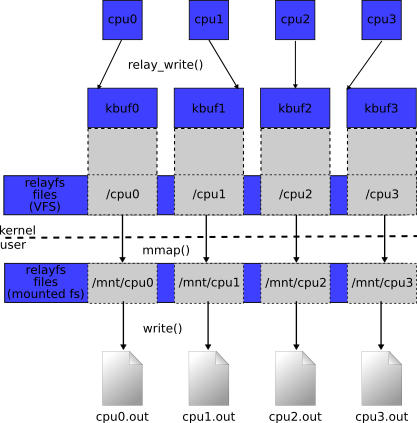
Relay (Relay filesystem) is a mechanisim used to transfer the data from the kernel space to the user space within the Linux OS. The advantage of relay comparing with other means like debugfs or proc is its ability to handle the big data efficiently. This post will show an example of relay using kernel 3.9.6. May it help.

1. relay

http://relayfs.sourceforge.net/

2. kernel doc for relay

https://www.kernel.org/doc/Documentation/filesystems/relay.txt

3. relayArp

relayArp.c under km is the kernel module used to pop up 2 ARP msgs from the kernel space to the user space; relayArp_us.c under us is the user-space programe used to read and decode the 2 ARP msgs from the kernel. All the code could be found in github below. Only key points and running results are listed here for the reference.

/*
 * create_buf_file() callback.  Creates relay file in debugfs.
 */
static struct dentry *create_buf_file_handler(const char *filename,
                                              struct dentry *parent,
                                              int mode,
                                              struct rchan_buf *buf,
                                              int *is_global)
{
        return debugfs_create_file(filename, mode, parent, buf,
                                   &relay_file_operations);
}

/*
 * remove_buf_file() callback.  Removes relay file from debugfs.
 */
static int remove_buf_file_handler(struct dentry *dentry)
{
        debugfs_remove(dentry);

        return 0;
}

/*
 * relay interface callbacks
 */
static struct rchan_callbacks relay_callbacks =
{
        .create_buf_file = create_buf_file_handler,
        .remove_buf_file = remove_buf_file_handler,
};

—————————————————————-

  /* Open the channel */
        global_rchan = relay_open(“cpu_arp”, NULL, 8192, 2, &relay_callbacks, NULL);
        if (global_rchan == NULL)
        {
                printk(KERN_ERR “relay_open failuren”);
                return -ENOMEM;
        }

        /* Write to the channel – no return value for relay_write */
        relay_write(global_rchan, &arp_msg, sizeof(arp_msg));

[root@daveti debug]# pwd
/sys/kernel/debug
[root@daveti debug]# ll
total 0
drwxr-xr-x.  2 root root 0 Jun 28 09:42 acpi
drwxr-xr-x. 19 root root 0 Jun 28 09:42 bdi
drwxr-xr-x.  2 root root 0 Jun 28 09:42 bluetooth
drwxr-xr-x.  3 root root 0 Jun 28 09:42 boot_params
drwxr-xr-x.  2 root root 0 Jun 28 09:42 cleancache
-r——–.  1 root root 0 Jun 28 10:41 cpu_arp0
-r——–.  1 root root 0 Jun 28 10:41 cpu_arp1
-r——–.  1 root root 0 Jun 28 10:41 cpu_arp2
-r——–.  1 root root 0 Jun 28 10:41 cpu_arp3
drwxr-xr-x.  2 root root 0 Jun 28 09:42 cxgb4
drwxr-xr-x.  4 root root 0 Jun 28 09:42 dri
drwxr-xr-x.  2 root root 0 Jun 28 09:42 dynamic_debug
drwxr-xr-x.  2 root root 0 Jun 28 09:42 extfrag
drwxr-xr-x.  2 root root 0 Jun 28 09:42 frontswap
drwxr-xr-x.  4 root root 0 Jun 28 09:42 hid
drwxr-xr-x.  2 root root 0 Jun 28 09:42 kprobes
drwxr-xr-x.  2 root root 0 Jun 28 09:42 kvm
drwxr-xr-x.  2 root root 0 Jun 28 09:42 mce
drwxr-xr-x.  2 root root 0 Jun 28 09:42 regmap
-rw-r–r–.  1 root root 0 Jun 28 09:42 sched_features
-r–r–r–.  1 root root 0 Jun 28 09:42 suspend_stats
drwxr-xr-x.  6 root root 0 Jun 28 09:42 tracing
drwxr-xr-x.  4 root root 0 Jun 28 09:42 usb
drwxr-xr-x.  2 root root 0 Jun 28 09:42 virtio-ports
-r–r–r–.  1 root root 0 Jun 28 09:42 wakeup_sources
drwxr-xr-x.  2 root root 0 Jun 28 09:42 x86
drwxr-xr-x.  3 root root 0 Jun 28 09:42 xen
[root@daveti debug]# cat cpu_arp0
[root@daveti debug]# cat cpu_arp1
[root@daveti debug]# cat cpu_arp2
€Id
H

€Id
HIx!!#

[root@daveti debug]# cat cpu_arp3
[root@daveti us]# ./relayArp_us
ptr[0] = 0x0
ptr[1] = 0x1
ptr[2] = 0x80
ptr[3] = 0x0
ptr[4] = 0x6
ptr[5] = 0x4
ptr[6] = 0x0
ptr[7] = 0x1
ptr[8] = 0x49
ptr[9] = 0x72
ptr[10] = 0x16
ptr[11] = 0x8
ptr[12] = 0x64
ptr[13] = 0x14
ptr[14] = 0x81
ptr[15] = 0x19
ptr[16] = 0xa
ptr[17] = 0x48
ptr[18] = 0x0
ptr[19] = 0x0
ptr[20] = 0x0
ptr[21] = 0x0
ptr[22] = 0x0
ptr[23] = 0x0
ptr[24] = 0x81
ptr[25] = 0x19
ptr[26] = 0xa
ptr[27] = 0xb
ptr[0] = 0x0
ptr[1] = 0x1
ptr[2] = 0x80
ptr[3] = 0x0
ptr[4] = 0x6
ptr[5] = 0x4
ptr[6] = 0x0
ptr[7] = 0x2
ptr[8] = 0x49
ptr[9] = 0x72
ptr[10] = 0x16
ptr[11] = 0x8
ptr[12] = 0x64
ptr[13] = 0x14
ptr[14] = 0x81
ptr[15] = 0x19
ptr[16] = 0xa
ptr[17] = 0x48
ptr[18] = 0x49
ptr[19] = 0x78
ptr[20] = 0x21
ptr[21] = 0x21
ptr[22] = 0x23
ptr[23] = 0x90
ptr[24] = 0x81
ptr[25] = 0x19
ptr[26] = 0xa
ptr[27] = 0xb
[root@daveti us]# ./relayArp_us
open failure for file /sys/kernel/debug/cpu_arp0: No such file or directory
open failure for file /sys/kernel/debug/cpu_arp1: No such file or directory
open failure for file /sys/kernel/debug/cpu_arp2: No such file or directory
open failure for file /sys/kernel/debug/cpu_arp3: No such file or directory
[root@daveti us]#

Project Name: relayArp
Destination: Linux kernel relay example with ARP msg
Language: C
IDE: Vim
Library:
Project Web: https://github.com/daveti/relayArp
Git Read Only: https://github.com/daveti/relayArp.git

Posted in OS, Programming | Tagged , , , , | Leave a comment

darp – how to write your own arp command

For certain reasons, I need to refer to the source files of arp cmd. However, been searching on the net for long time and ended up with no luck. Actually, there is a SRPM mirror for Fedora 18, where you are supposed to find all the source RPMs for all the cmds included in Fedora 18 (but still, no arp). The good thing is I find sth useful from BusyBox, which is an open-source and lightweighted implementation for embedded Linux. Based on that, darp is written. May it help.

1. SRPMs for Fedora 18 (UO mirror)

http://mirror.uoregon.edu/fedora/linux/releases/18/Fedora/source/SRPMS/

2. BusyBox

http://busybox.net/

3. darp

The behavior of darp and arp is similar. Eventually, that was the intention!
darp -a: read “/proce/net/arp” and print the info to the stdout
darp -d: ioctl(SIOCDARP) to delete an entry within the ARP cache
darp -g: ioctl(SIOCGARP) to get an entry within the ARP cache
darp -s: ioctl(SIOCSARP) to set/add an entry into the ARP cache

[daveti@daveti darp]$ ./darp -h
darp -a:
display all the entries within the ARP cache
darp -v:
enable/disable verbose mode
darp -i <interface>:
change the default name of network interface
darp -d <IP>:
remove the entry with this IP address
darp -g <IP>:
get the entry with this IP address
darp -s <IP> <MAC>:
add an entry into the ARP cache with this IP and MAC addresses
darp -h:
display the usage menu
[daveti@daveti darp]$

[root@daveti darp]# ./darp -a
vl-198-gw.uoregon.edu (184.171.60.1) at 00:00:5e:00:01:01 [ether] on em1
dyn-184-171-61-38.uoregon.edu (184.171.61.38) at ec:1a:59:8a:57:96 [ether] on em1
vl-198.uonet3-gw.uoregon.edu (184.171.60.2) at 00:d0:01:7a:28:00 [ether] on em1
[root@daveti darp]# ./darp -g 184.171.61.38
MAC: ec:1a:59:8a:57:96
[root@daveti darp]# ./darp -s 255.255.255.255 00:ff:00:ff:00:ff
[root@daveti darp]# ./darp -a
vl-198-gw.uoregon.edu (184.171.60.1) at 00:00:5e:00:01:01 [ether] on em1
dyn-184-171-61-38.uoregon.edu (184.171.61.38) at ec:1a:59:8a:57:96 [ether] on em1
vl-198.uonet3-gw.uoregon.edu (184.171.60.2) at 00:d0:01:7a:28:00 [ether] on em1
255.255.255.255 (255.255.255.255) at 00:ff:00:ff:00:ff [ether] on em1
[root@daveti darp]# ./darp -d 255.255.255.255
[root@daveti darp]# ./darp -a
vl-198-gw.uoregon.edu (184.171.60.1) at 00:00:5e:00:01:01 [ether] on em1
dyn-184-171-61-38.uoregon.edu (184.171.61.38) at ec:1a:59:8a:57:96 [ether] on em1
vl-198.uonet3-gw.uoregon.edu (184.171.60.2) at 00:d0:01:7a:28:00 [ether] on em1
255.255.255.255 (255.255.255.255) at <incomplete> on em1
[root@daveti darp]# arp -a
vl-198-gw.uoregon.edu (184.171.60.1) at 00:00:5e:00:01:01 [ether] on em1
dyn-184-171-61-38.uoregon.edu (184.171.61.38) at ec:1a:59:8a:57:96 [ether] on em1
vl-198.uonet3-gw.uoregon.edu (184.171.60.2) at 00:d0:01:7a:28:00 [ether] on em1
? (255.255.255.255) at <incomplete> on em1
[root@daveti darp]#

Project Name: darp
Destination: Dave’s ARP command
Language: C
IDE: Vim
Library:
Project Web: https://github.com/daveti/darp
Git Read Only: https://github.com/daveti/darp.git

Posted in Dave's Tools | Tagged , , | Leave a comment

pyCluster – Python Clustering

pyCluster is a Python implementation for clustering algorithms, including PAM and Clara. Enjoy!

1. PAM

kMedoids – PAM implementation
See more : http://en.wikipedia.org/wiki/K-medoids
The most common realisation of k-medoid clustering is the Partitioning Around Medoids (PAM) algorithm and is as follows:[2]
1. Initialize: randomly select k of the n data points as the medoids
2. Associate each data point to the closest medoid. (“closest” here is defined using any valid distance metric, most commonly Euclidean distance, Manhattan distance or Minkowski distance)
3. For each medoid m
For each non-medoid data point o
Swap m and o and compute the total cost of the configuration
4. Select the configuration with the lowest cost.
5. repeat steps 2 to 4 until there is no change in the medoid.

2. Clara

CLARA implementation
1. For i = 1 to 5, repeat the following steps:
2. Draw a sample of 40 + 2k objects randomly from the
entire data set,2 and call Algorithm PAM to find
k medoids of the sample.
3. For each object Oj in the entire data set, determine
which of the k medoids is the most similar to Oj.
4. Calculate the average dissimilarity of the clustering
obtained in the previous step. If this value is less
than the current minimum, use this value as the
current minimum, and retain the k medoids found in
Step 2 as the best set of medoids obtained so far.
5. Return to Step 1 to start the next iteration.

Project Name: pyCluster
Destination: Python Clustering
Language: Python
IDE: Vim
Library:
Project Web: https://github.com/daveti/pycluster
Git Read Only: https://github.com/daveti/pycluster.git

Posted in Dave's Tools | Tagged , , , | Leave a comment

pyMns – Python Markov Network Solver

pyMns is a python implementation for Markov Network solver, which read the UAI file (and UAI evidence as well) to do inference with some classical algorithms in Probabilistic Graph Model, including Variable Elimination (VE) and Belief Propagation (BP). Have fun!

# pyMNS.py
# Python Markov Network Solver
# pyMNS reads in an uai file with description of a Markov Network
# and outputs the partition function for this MN.
# Ref: http://www.cs.huji.ac.il/project/UAI10/fileFormat.php
# Version 0.4
# 1. Enlarged system recursion limit for t4.uai
# June 5, 2013
# Version 0.3
# 1. Added loopy Belief Propagation
# May 30, 2013
# Version 0.2
# 1. Added Variable Elimination algorithm
# 2. Added min-neighbors heuristic
# 3. Added support for evidence file
# 4. Added support for MAP inference
# 5. Added other ordering heuristics
# May 12, 2013
# Version 0.1
# Input: *.uai
# Output: partition function
# May 1, 2013
# daveti@cs.uoregon.edu
# http://daveti.blog.com

Project Name: pyMns
Destination: Python Markov Network Solver
Language: Python
IDE: Vim
Library:
Project Web: https://github.com/daveti/pymns
Git Read Only: https://github.com/daveti/pymns.git

Posted in Dave's Tools | Tagged , , , , | Leave a comment

Some pitfalls in Python ~ remove, recursion and sign

This post is the summary of some pitfalls of Python programming I have encountered. May it help:)

1. remove()

List’s remove function is used to remove certain item from the list. However, remove function always removes the first item it encounters. If we want to remove an item with certain index, then remove function may introduce a bug:

>>> aList = [0, 1, 2, 1]
>>> index = 3
>>> aList.remove(aList[index])
>>> aList
[0, 2, 1]
>>>
Remove function does remove the item 1, but with index of 1 instead of 3. In this case, to remove certain item within certain index, please use pop():

>>> aList = [0, 1, 2, 1]
>>> index = 3
>>> aList.pop(index)
1
>>> aList
[0, 1, 2]
>>>

2. Recursion Limit

RuntimeError: maximum recursion depth exceeded

The default recursion/stack depth limit is 1000 by default. It is easily to exceed this limitation when you are programming for AI/Machine Learning things. When this happens, enlarge the limitation:

sys.setrecursionlimit(20000)

3. sign()

If you wonder if there was/is/will be a sign function in Python, check the argument about sign function here: http://stackoverflow.com/questions/1986152/why-python-doesnt-have-a-sign-function The key point here is to use copysign instead of sign

math.copysign(1, aNumber) == math.sign(aNumber)

Posted in Programming | Tagged | Leave a comment