Fedora 20 – some post installation issues may bother

Even though Fedora wiki has posted some common issues after the system is upgraded into Fedora 20, interestingly, none of them applies the issues I have encountered:( Anyway, this post is for guys who may have a little bit chance of suffering similar issues of newly upgraded Fedora 20. Cheers~

0. fedup

You could use ‘yum’ to do the upgrading (http://fedoraproject.org/wiki/Upgrading_Fedora_using_yum). I use ‘fedup’ (https://fedoraproject.org/wiki/FedUp)to upgrade from Fedora 18 to 20. It works all right except you have to manually insert the gpg keys for RPM fusion repos if they are in your yum repo. Unless ‘fedup’ runs smoothly, there would be no way to see the ‘System Upgrade’ in the grub after reboot…

Error: https://bugzilla.redhat.com/show_bug.cgi?id=1044086
Downloading failed: GPG key retrieval failed: [Errno 14] curl#37 – “Couldn’t open file /etc/pki/rpm-gpg/RPM-GPG-KEY-fedora-x86_64”

Solution:
a. Bypass the gpg check
fedup-cli –network 20 –nogpgcheck
b. Insert the keys manually
rpmkeys –import /etc/pki/rpm-gpg/RPM-GPG-KEY-fedora-20-primary
rpmkeys –import /etc/pki/rpm-gpg/RPM-GPG-KEY-rpmfusion-nonfree-fedora-20

1. common bugs of Fedora 20

https://fedoraproject.org/wiki/Common_F20_bugs

2. KVM/SELinux

Starting KVM may report the weird error like. This is related with SELinux. However, it is not SELinux’s fault. The damn root cause is nvidia…Checking out these 2 latest bugs from RedHat…

https://bugzilla.redhat.com/show_bug.cgi?id=1018083
https://bugzilla.redhat.com/show_bug.cgi?id=895161

Error:
/usr/bin/qemu-system-x86_64: error while loading shared libraries: libGL.so.1: failed to map segment from shared object: Permission denied

Solution:
sudo setsebool -P virt_use_execmem 1

3. ddclient

My ddclient continued reporting SSL failure on verifying server certificate and could not get connected with my dynamic DNS server (HE) like below. It turns out that the SSL authentication disabled before by default is enabled in ddclient. To force the connection, ssl=no has to be added into /etc/ddclient.conf for your DDNS entry.

WARNING:  cannot connect to dyn.dns.he.net:443 socket:  IO::Socket::IP configuration failed SSL connect attempt failed with unknown error error:14090086:SSL routines:SSL3_GET_SERVER_CERTIFICATE:certificate verify failed
FAILED:   updating daveti.me: Could not connect to dyn.dns.he.net.

4. nvidia (again)

There was a long story about my previous painful experience with nvidia (https://davejingtian.org/2013/03/02/nvidia-sucks-issues-related-with-the-official-gpu-driver-and-cuda-on-linux-fedora-18/). On my Fedora 18, I installed the nvidia property driver, deleted it (ASAP) and recovered the nouveau driver. However, all the driver configure files generated by nvidia was left there and they did not bother Fedora 18. Then it became the nightmare for Fedora 20 – display resolution was unable to change (640*480). Only rescue mode could have a normal display. Deeper investigation finds nouveau driver was not loaded, which reminds me all the changes happened under /etc/modprobe.d – Remove the nvidia conf file and unblock nouveau mod in the blacklist.conf. God bless us!

5. some daemons

This is weird too. Some daemons were not started automatically once the system is boot as they used to, like ddclient and tcsd. Anyway, fix that:

systemctl status XXX
systemctl enable XXX –system

Posted in Linux Distro | Tagged , , , , , , , | 1 Comment

A paper review – seL4: Formal Verification of an OS kernel

Paper review for –
seL4: Formal Verification of an OS Kernel
daveti@cs.uoregon.edu
Dec 10, 2013

How could we guarantee the code we are running is right? Even after different and long-time testing, we have yet not been so sure that there is no bug in the code. Moving forward, we may want to know if the OS kernel is behaving correctly as expected, as all other soft artifacts are based on the OS. Then we are inspired by the method widely used by the hardware design and verification – formal verification.

Formal verification is based on FSM. All the system states are modeled and the corresponding state transitions are analyzed. Temporal Logic (TL) or Computational Tree Logic (CTL) could be used to construct the model. As long as there is a prover for the target logic language, then there is a way to know if the whole system has some defects. Seems we have got the powerful tools we need, so what? Are we able to do formal verification for the Linux kernel then? The answer is no. The reason is straightforward, there is no way to describe a system based on FSM with more than 4 million lines of code (linux kernel 3.x).

Then what is the next? Apparently, we need to find a small OS kernel, which does not have so many crazy lines of code – seL4, a microkernel based on L4, with 8,700 lines of C code, becomes the natural selection. However, before we could start our formal verification for the seL4, at the very first, we have to give bug a formal definition. According to the paper, bug = deviation from the design. The definition is straightforward but implies an important prerequisite – the design should be correct! Then it starts clear now. To do a formal verification for the OS kernel, we have to prove that the design of the kernel is sound. How to do that? Still formal verification. A certain logic language would be used to depict the high level design of the kernel and the corresponding prover will be used to prove the design has not flaw.

What about the implementation? It seems we are missing something important. Even though we could assure that the design is right, how could we make sure –
1. the implementation is right and
2. the implementation fulfills/follows the design?

All the two points need some ‘golden value’ for reference and comparison. The high level design, however, is too abstract to connect with the real implementation. Actually, during the phase of developing a new OS kernel, there is another important document – specification (spec), which is used to instruct the real implementation. Theoretically, spec should reveal all the technical details about the implementation and the real implementation should strictly follow the spec on the other hand. Now, there are high level design (hld), spec and implementation (impl). Now what?

Here comes the idea/concept of refinement from the formal verification. In formal methods, program refinement is the verifiable transformation of an abstract (high-level) formal specification into a concrete (low-level) executable program. (from wikipedia). In a word, what is refinement and how could we define A refines B?

sel4-fgFigure 7 from the paper

If for each transitions from s to s’ in M2, there exists the corresponding transition from sigma to sigma’ in M1 (The transitions correspond if there exists a relation R between the states s and σ such that for each concrete state in s′ there is an abstract one in σ′ that makes R hold between them again – from the paper). Then M2 refines M1.

The whole picture of doing formal verification is becoming clear. If imll refines spec && spec refines hld, then impl refines hld, because of transitive property of refinement. If we could do the formal verification for each layer (hld, spec, impl), which means we should have all the state transitions fro each layer, it should be a labor effort to verify the refinement. (NOTE, the paper did not talk about how to do the refinement but I doubt this may need human effort.) Anyway, let us start now.

hld
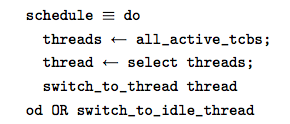
As Isabelle is used as the general prover, hld is written in high order logic (HOL) directly. Remember here hld just provides the high level behaviors of the kernel. There is no implementation details involved there. The hld for the kernel scheduler looks like below:

sel4-f3Figure 3 from the paper

spec
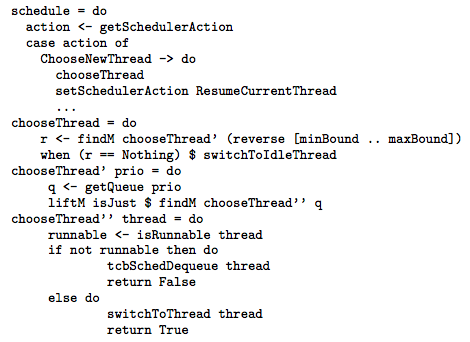
The most important contribution of the paper would be way to do formal verification for this layer. A subset of Haskell is used to write the spec. Moreover, the spec has provided all the implementation details for the real implementation. You can imagine we have already implemented the kernel using Haskell (crazy, right?). Moving on, all the Haskell code for the spec could be then translated into HOL, which is provable by Isabelle. The spec for the kernel scheduler looks like below:

sel4-f4Figure 4 from the paper

impl
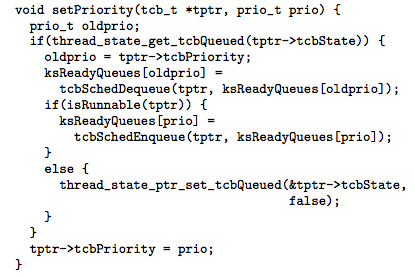
The most interesting part of the paper would be the way to do formal verification for this layer. As GCC is not trusted and we have proved that spec is ‘perfect’ (being provable by Isabelle and providing all the implementation details in the Haskell code), is there a way to generate the C code from the Haskell code directly and automatically? Yes, of course. For details, please refer to the paper ‘D. Cock. Bitfields and tagged unions in C: Verification through automatic generation’. This amazing tool takes the spec as the input and generate the C code as the output. More important, it also generate the corresponding HOL code for proofs! The generated impl C code for the part of the kernel scheduler looks like below:

sel4-f5Figure 5 from the paper

statistics

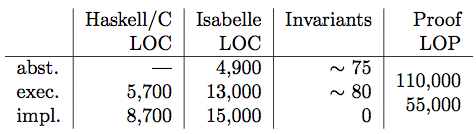
Below is the statistics for the whole formal verification for the OS kernel.

sel4-t1Table1 from the paper

In summary, though we have spent only a short review to cover all the essence of this paper, one can imagine how difficult it would be to formal verification even for the small OS kernel with only 8,700 lines of code. The whole process has lasted for around 4 years with more than 10 developers devoted themselves into this project. Again, however, the take away here is not how hard it would be to do the formal verification for the OS kernel but shows that it is possible to do the formal verification. The whole process of the formal verification, the language and the tools developed along the way, would provide us some insightful ideas for what to be done next.

Posted in Embedded System, OS, Programming, Security | Tagged , , , , | Leave a comment

cgpic – Calling GProlog in C

Prolog is a straight-forward way to implement simple logic rules and do the query of the system. GProlog(gprolog) is the GNU version of Prolog implementation. To leverage the power of gprolog into our system code (C/C++), there are usually 2 ways – using IPC or C interface. (GProlog dev usually call C/C++ in the GProlog). This post is focusing on calling GProlog in C using GProlog C interfaces. Thanks Sean and Michal from GNU Prolog User forum for answering my questions. Have fun~

0. Reference

http://gprolog.univ-paris1.fr/manual/gprolog.html#sec371
http://gnu-prolog.996310.n3.nabble.com/How-to-get-the-return-value-from-gprolog-in-C-td1166.html
http://gnu-prolog.996310.n3.nabble.com/Is-that-possible-to-call-dynamic-function-in-the-C-interface-td1177.html

1. IPC

The reason we would not like to do IPC with GProlog is the performance. Even though IPC with pipes is not that slow, the performance bottle neck may be the IPC if all other (C/C++) stuffs in the code run fast.

2. Calling the GProlog in C using GProlog C/C++ interface

Recalling the common patterns used in the interactive gprolog interpreter, we need to handle 3 calling/passing styles in the C code. All the code/examples are based on the pl file below:

% Dynamic function definition
:- dynamic(parent/2).

parent(bob,mary).
parent(jane,mary).
parent(mary,peter).
parent(paul,peter).
parent(peter,john).

anc(X, Y) :-
parent(X, Y).

anc(X, Z) :-
parent(X, Y),
anc(Y, Z).

a. solution query – anc(X, john).

func = Pl_Find_Atom(“anc”);
Pl_Query_Begin(PL_TRUE);
arg[0] = Pl_Mk_Variable();
arg[1] = Pl_Mk_String(n2);
nb_sol = 0;
res = Pl_Query_Call(func, 2, arg);
while (res)
{
sol[nb_sol++] = Pl_Rd_String(arg[0]);
res = Pl_Query_Next_Solution();
}
Pl_Query_End(PL_RECOVER);

b. judgement query – anc(john, bob).

func = Pl_Find_Atom(“anc”);
Pl_Query_Begin(PL_TRUE);
arg[0] = Pl_Mk_String(n1);
arg[1] = Pl_Mk_String(n2);
res = Pl_Query_Call(func, 2, arg);
Pl_Query_End(PL_RECOVER);

c. dynamic function – asserta(parent(dave, john)).

func = Pl_Find_Atom(“parent”);
Pl_Query_Begin(PL_TRUE);
arg[0] = Pl_Mk_String(n1);
arg[1] = Pl_Mk_String(n2);
arg2[0] = Pl_Mk_Callable(func, 2, arg);
func = Pl_Find_Atom(“asserta”);
res = Pl_Query_Call(func, 1, arg2);

3. The power of gplc

gplc is eventually a wrapper for gcc, which allows you to compile pl and C file the same time to generate the binary containing all the logic functionalities you need in GProlog. More over, all the gcc parameters could be passed from gplc. For details, please refer to the code repo down there.

4. R.t.D.C. – Read the Damn Code

https://github.com/daveti/cgpic

Posted in AI/ML, Programming | Tagged , , | Leave a comment

Connect the Gumstix using minicom in Mac OS

Gumstix.org has provided the most useful information for developers about gumstix development, though a little bit out dated. This post will show a real example for Mac OS (10.9) to connect with a gumstix (Overo+Palo35) using minicom. Have fun!

0. gumstix.org

http://gumstix.org/connect-to-my-gumstix-system.html

1. minicom

Minicom is always recommended based on the previous experience. It supports both Linux and Mac OS. As the link above has covered the Linux. We will try to install minicom into Mac OS. Of course, we do not want to bootstrap from the source file. So please install either brew or port as your apt-get/yum for the Mac. Then
brew install minicom
NOTE: brew update may be needed or the latest version of Xcode (command line tools) is needed for the latest Mac OS (10.9)

2. minicom -s

This will drive you into the interactive menu of minicom. First, we need to choose “Serial Port Setup” and then configure the device and the connection. The link from gumstix.org is still helpful for all these configurations except for the name of the device. You have to figure out the name of the device after the gumstix is connected. In my case, I am using a USB converter and the gumstix is eventually connected to my Mac via a USB port. Hunting under /dev, you will find it – tty.usbserial-A7005snv.

3. minicom -o

Run the command above and then power on the gumstix and then login~

OPTIONS:
Compiled on Nov  4 2013, 21:48:22.
Port /dev/tty.usbserial-A7005snv
Press Meta-Z for help on special keys
?t?ص?
Texas Instruments X-Loader 1.5.1 (Jul 17 2012 – 08:47:49)
OMAP3530-GP ES3.1
Board revision: 0
Reading boot sector
Loading u-boot.bin from mmc
U-Boot 2011.09 (Jul 16 2012 – 16:50:21)

Posted in Embedded System | Tagged , , | Leave a comment

create Linux kernel proc entry – some good-to-know tricky stuffs

It costs me 2 days to make a kernel module written few years ago back to work again. However, there is nothing fancy within the module except adding a new proc entry under /proc/sys/net/ipv4, which I would never know is the nightmare. There are a lot of posts introducing how to add a entry under /proc, like this one (http://www.rt-embedded.com/blog/archives/creating-and-using-proc-files/). And this post is intending to make it clear and to avoid wasting time thinking about why ‘this does not work’ (kernel oops!). No complicate details into the kernel but the focusing on the topic~

1. create_proc_entry()

This is the kernel function used to create a proc entry. The complete signature of this function (include/linux/proc_fs.h)

extern struct proc_dir_entry *create_proc_entry(const char *name, umode_t mode,
						struct proc_dir_entry *parent);

2. create_proc_entry(“whatever”, 0644, NULL);

This (should) always work! What we are doing is to create a new proc entry – ‘/proc/whatever’.

3. create_proc_entry(“sys/net/ipv4/whatever”, 0644, NULL);

It used to work before. BUT it does NOT work anymore! I am not sure the exact kernel version which started to prevent us from doing this. Kernel Oops (stack dump) will be generated then saying the kernel is not happy.

4. create_proc_entry(“whatever”, 0644, parent);

The ‘parent’ should be the proc_dir_entry pointing to the proc dir, like “/proc/sys/net/ipv4”. The common way to get of this parent proc dir is to use the kernel file structure and inode. For instance:

struct file *fp = filp_open(MODULE_PATH_DIR, O_RDONLY, 0);
parent = PDE(fp->f_dentry->d_inode);
filp_close(fp, NULL);
if (parent == NULL)
{
        printk(KERN_INFO “Get proc dir entry [%s] failure\n”, MODULE_PATH_DIR);
        return -1;
}
mod_entry = create_proc_entry(MODULE_FILE_NAME, 0644, parent);

However, as you might guess, it used to work before BUT it does NOT work anymore. Again I am not sure since when. When kernel Oops happens, you should know what is going on.

5. So what is the point here?

The point here is if you want to create a proc entry, consider to put it right under /proc instead of deep into the subdir of /proc, like the one mentioned above – /proc/sys/net/ipv4. I assume (have not gone thru the code to verify it) that the kernel does not allow to create any proc entry under the subdir of /proc for either security or management reasons. Instead, each subdir of /proc is viewed like an independent component, which needs specific system calls to add a new entry. Check the link here (https://lkml.org/lkml/2008/6/8/116). For /proc/sys, register_sysctl_table() is used to do that. Put it in anther way, put the new proc entry right under /proc is always straightforward.

6. proc_create()

This is the latest way to add a new proc entry, which means create_proc_entry is deprecated now. There is a good example from stackoverflow (http://stackoverflow.com/questions/8516021/proc-create-example-for-kernel-module). However, like you will see, the ‘parent’ is still NULL. Then I suppose this new function does not break my assumption above.

Posted in OS, Programming | Tagged , , | 1 Comment

timer queue – a way to handle multiple timers using one thread

This post introduces a general way to handle multiple timers using one thread using C. K.R.K.C. -daveti

1. what is timer?

The essence of timer is eventually a thread (either Python or Java threads are actually mapped and executed as threads in the OS). For UNIX/Linux, timer is usually created by POSIX Thread lib (pthread). Almost all the multi-thread applications nowadays have timers. Even though the simplest timer may be just sleeping a long time before it wakes up, timers in general, are used so widely that we may ignore the fact that there is timer. The famous example would be the modern time sharing OS, which are based on interrupt, which is timer (either from hardware or software).

2. how to create a timer?

Take a UNIX/Linux system for example. The standard way to create a timer is actually calling pthread_create a new thread. The job of this thread is kind of stupid – sleep some time at first, then wake up to check if it is time for ‘lunch’; if not, sleep again – (my dreamed way of life:) For sure, most of the timers should have much more complicated work to do once the timer expires.

3. how about if we need thousands of timers?

Though the application which needs thousands of timers may sound impractical, there may be that much timers running on a powerful server’s OS providing the support for different applications. As we mentioned before, timer is eventually a thread in the OS. The problem is how many timer can we create on a system. Apparently, the number is not infinity. When you run ‘ulimit -a’ under UNIX/Linux, you will find the max number for running threads supported by this system. Then what if the number of timer are reaching the max number supported by OS? The answer is a lot of timers may fail to wake up timely.

4. engineering way – multiple timers using one thread!

The way to handle the case above is to using timer queue – a queue used to hold all the timers and a thread running and checking if there is any timer expires. Nothing new or fancy here as the method has been widely accepted and widely used by engineers. Detailed implementation could be found here – https://github.com/daveti/tq

5. what is the issue here?

The ridiculous thing of Computer Science (from my understanding) is that Computer/CPU is so precise but our way of using Computer/CPU is so greedy that all we could guarantee is being ‘almost’ instead of ‘precise’. This is the truth for timer sharing OS but real-time OS/system has another story for this. Anyway, my point is we may not guarantee this one-thread timers work as we expect. The tricky thing is the sleeping time of the thread (s) VS. the time of going thru the queues and doing the corresponding work (d) VS. the timers within the timer queue (t). You can imagine mathematical analysis for the 3 variables (I am not gonna do it:) In a word, to make it ‘almost’ work, you have to figure out the right settings for the 3 variables. The good thing here is ‘almost’ is fairly good enough~

Posted in Programming | Tagged , , , | 3 Comments

Something about dynamic lib – ldd, ld.so.conf, nm, dlsym()

Dynamic lib may be the widely used mechanism for code reusing and memory saving, both for Windows and UNIX/Linux systems. To better understand the dynamic lib, we will try to fix the famous error during linking and investigate the symbols within the lib.

0. ldd

ldd cmd is used to display the necessary dynamic lib used by certain binary file.
root@arpsec01:~/tpm/rpc# ldd rpc
linux-vdso.so.1 => (0x00007ffff9bff000)
libtspi.so.1 => /usr/lib/libtspi.so.1 (0x00007fc6ec53e000)
libc.so.6 => /lib/x86_64-linux-gnu/libc.so.6 (0x00007fc6ec17f000)
libpthread.so.0 => /lib/x86_64-linux-gnu/libpthread.so.0 (0x00007fc6ebf61000)
libcrypto.so.1.0.0 => /lib/x86_64-linux-gnu/libcrypto.so.1.0.0 (0x00007fc6ebb86000)
/lib64/ld-linux-x86-64.so.2 (0x00007fc6ec7c4000)
libdl.so.2 => /lib/x86_64-linux-gnu/libdl.so.2 (0x00007fc6eb982000)
libz.so.1 => /lib/x86_64-linux-gnu/libz.so.1 (0x00007fc6eb76a000)
root@arpsec01:~/tpm/rpc#

1. Error while loading shared libraries: XXX.so.xxx

a. The dynamic lib is missing – install
b. The lib has been installed under /lib or /usr/lib – ldconfig
c. The lib has been installed under somewhere else, like /usr/local/lib – ld.so.conf
# cat /etc/ld.so.conf
include ld.so.conf.d/*.conf
echo “/usr/local/lib” >> /etc/ld.so.conf
# ldconfig
d. The lib has been installed somewhere else and temporary linking is needed – LD_LIBRARY_PATH
export LD_LIBRARY_PATH=/usr/local/lib:$LD_LIBRARY_PATH

2. How could I know what (functions/variables) are contained by certain dynamic lib?

Generally speaking, there are 2 ways to do that.
a. nm -C -D path_to_a_dynamic_lib – nm is so powerful that it will list all the symbols contained by this dynamic lib, including functions (T) and variables. The most common case for nm would be ‘nm -C -D path_to_a_dynamic_lib | grep function_name’, which is used to determine if certain function is contained by this dynamic lib.
root@arpsec01:~# nm -C -D /usr/lib/libtspi.so | grep RPC_OpenContext_TP
000000000001f9d0 T RPC_OpenContext_TP
root@arpsec01:~#
b. dlsym() – actually a system call interfacing with ld. dlopen() is used to open certain dynamic lib and dlsym() then could be used to check if certain symbol is contained or not. Example code is below.
root@arpsec01:~/ld_blog# cat myld.c
/*
* myld.c
* example source to use dl* functions
* to parse the content of a dynamic lib
* Usage: myld libname symbol
* Sep 2, 2013
* root@davejingtian.org
* http://davejingtian.org
*/

#include <stdio.h>
#include <dlfcn.h>

int main(int argc, char *argv[])
{
void *handle;
void *addr;

if (argc != 3)
{
printf(“Error: Missing parameters\n”);
return -1;
}

/* Get the handle of the lib */
handle = dlopen(argv[1], RTLD_NOW);
if (handle == NULL)
{
printf(“Error: dlopen %s [%s]\n”, argv[1], dlerror());
return -1;
}

/* Try the get the address of symbol */
addr = dlsym(handle, argv[2]);
if (addr == NULL)
{
printf(“Error: dlsym %s [%s]\n”, argv[2], dlerror());
dlclose(handle);
return -1;
}

printf(“Symbol[%s]@0x%x\n”, argv[2], addr);

dlclose(handle);
return 0;
}
root@arpsec01:~/ld_blog# gcc -o myld myld.c -ldl
myld.c: In function ‘main’:
myld.c:42:2: warning: format ‘%x’ expects argument of type ‘unsigned int’, but argument 3 has type ‘void *’ [-Wformat]
root@arpsec01:~/ld_blog# ./myld libtspi.so RPC_OpenContext_TP
Symbol[RPC_OpenContext_TP]@0x917449d0
root@arpsec01:~/ld_blog#

3. Functions(symbols) are the memory address, so what?

root@arpsec01:~/ld_blog# cat myld2.c
/*
* myld2.c
* Load the math library, and print the cosine of 2.0
* Reference: man 3 dlsym
* Sep 2, 2013
* root@davejingtian.org
* http://davejingtian.org
*/

#include <stdio.h>
#include <stdlib.h>
#include <dlfcn.h>

int
main(int argc, char **argv)
{
void *handle;
double (*cosine)(double);
char *error;

handle = dlopen(“libm.so”, RTLD_LAZY);
if (!handle) {
fprintf(stderr, “%s\n”, dlerror());
exit(EXIT_FAILURE);
}

dlerror(); /* Clear any existing error */

/* Writing: cosine = (double (*)(double)) dlsym(handle, “cos”);
would seem more natural, but the C99 standard leaves
casting from “void *” to a function pointer undefined.
The assignment used below is the POSIX.1-2003 (Technical
Corrigendum 1) workaround; see the Rationale for the
POSIX specification of dlsym(). */

*(void **) (&cosine) = dlsym(handle, “cos”);

if ((error = dlerror()) != NULL) {
fprintf(stderr, “%s\n”, error);
exit(EXIT_FAILURE);
}

printf(“%f\n”, (*cosine)(2.0));
dlclose(handle);
exit(EXIT_SUCCESS);
}
root@arpsec01:~/ld_blog# gcc -o myld2 myld2.c -ldl
root@arpsec01:~/ld_blog# ./myld2
-0.416147
root@arpsec01:~/ld_blog#

Posted in IDE_Make, Programming | Tagged , , , , , | Leave a comment

Use POSIX regex in C

There is no standard regex lib in glibc. However, almost all UNIXs, Linux and even Mac OS should support POSIX regex, which provides a way to do regex processing in C. Below is the real example under Linux. For Mac OS, different header files may be needed.

0. The different between POSIX basic regex and extended regex

http://en.wikipedia.org/wiki/Regular_expression#POSIX_basic_and_extended
In a word, to use “*|+|?”, extended mode should be chosen in regcomp. Detailed difference please refer to the link above.

/*
* Use regex in C with POSIX regex
* Reference: http://stackoverflow.com/questions/1085083/regular-expressions-in-c-examples
* root@davejingtian.org
* http://davejingtian.org
* Aug 22, 2013
*/
#include <stdio.h>
#include <stdlib.h>
#include <string.h>
#include <sys/types.h>
#include <regex.h>

int main()
{
regex_t regex;
int reti;
char msgbuf[100] = {0};

/* Compile regular expression */
reti = regcomp(&regex, “^a[[:alnum:]]”, 0);
if( reti ){ fprintf(stderr, “Could not compile regex\n”); exit(1); }

/* Execute regular expression */
reti = regexec(&regex, “abc”, 0, NULL, 0);
if( !reti ){
puts(“Match”);
}
else if( reti == REG_NOMATCH ){
puts(“No match”);
}
else{
regerror(reti, &regex, msgbuf, sizeof(msgbuf));
fprintf(stderr, “Regex match failed: %s\n”, msgbuf);
exit(1);
}

/* Free compiled regular expression if you want to use the regex_t again */
regfree(&regex);

/* The other examples */
reti = regcomp(&regex, “\\([0-9]+ ms\\) no”, REG_EXTENDED);
if (reti)
{
fprintf(stderr, “Could not compile regex\n”);
return -1;
}

reti = regexec(&regex, “(4 ms) no”, 0, NULL, 0);
if (!reti)
puts(“Match again – 4 ms”);
else if (reti == REG_NOMATCH)
puts(“No match here – 4 ms?”);

reti = regexec(&regex, “(x ms) yes”, 0, NULL, 0);
if (reti == REG_NOMATCH)
puts(“No match here – x ms”);

reti = regexec(&regex, “(44 ms) no”, 0, NULL, 0);
if (!reti)
puts(“Match again – 44 ms”);
else if (reti == REG_NOMATCH)
puts(“No match here – 44 ms?”);

/* Yet another stupid example */
regfree(&regex);
reti = regcomp(&regex, “ab+c”, REG_EXTENDED);
if (reti)
{
fprintf(stderr, “Cound not compile regex\n”);
return -1;
}

reti = regexec(&regex, “abc”, 0, NULL, 0);
if (!reti)
puts(“match again – abc”);

reti = regexec(&regex, “abbbc”, 0, NULL, 0);
if (!reti)
puts(“match again – abbbc”);

reti = regexec(&regex, “ac”, 0, NULL, 0);
if (!reti)
puts(“match again – ac?”);
else if (reti == REG_NOMATCH)
puts(“no match here – ac”);

return 0;
}

Posted in Programming | Tagged , , | Leave a comment

Official Ubuntu Linux kernel build (with IMA enabled)

As a branch of Debian, Ubuntu shares the same ideas on Linux kernel build, but with some difference. This post takes a great reference to the Ubuntu official wiki page on how to do kernel build. Moreover, we are going to enable IMA in the kernel configuration. K.R.K.C.

0. References

https://wiki.ubuntu.com/Kernel/BuildYourOwnKernel
https://davejingtian.org/2013/08/01/build-official-debian-linux-kernel/

1. Get the source

apt-get source linux-image-$(uname -r)

3. Prepare for the build

sudo apt-get build-dep linux-image-$(uname -r)
apt-get install libncurses5-dev

4. Add permission for the building scripts

chmod a+x debian/scripts/*
chmod a+x debian/scripts/misc/*

5. Clean the last build – this is needed to start a new build

fakeroot debian/scripts/rules clean

6. Edit the config – menuconfig

fakeroot debian/rules editconfigs
After IMA is enabled, the saved .config is conflicted with the forcing file of Ubuntu itself, which is used to provide the basic configuration for the kernel. Most of the time, this file is right. However, if you do know what you are doing, do the changes in the forcing file.
vi debian.master/config/enforce

7. Build

fakeroot debian/rules binary-headers binary-generic
This build will generate the image just for your current architecture. Then around 3 debs will be generated under your home directory. For amd64 arch, they are headers-all, headers-amd64 and image-amd64.

8. Install and Reboot

sudo dpkg -i *.deb
sudo reboot

Posted in OS | Tagged , , , | 3 Comments

Parallel PAM – a PAM implementation using Parallel Python

pyCluster is a Python implementation for clustering algorithms, including PAM and CLARA, which are widely used in Data Mining. To better the performance of PAM, parallel PAM is designed and implemented using Parallel Python. The experiment shows that parallel PAM, running in 4-CPU system using 4 working tasks, doubles the performance of serial PAM.

1. PAM

1. Initialize: randomly select k of the n data points as the medoids
2. Associate each data point to the closest medoid. (“closest” here is defined using any valid distance metric, most commonly Euclidean distance, Manhattan distance or Minkowski distance)
3. For each medoid m
        For each non-medoid data point o
            Swap m and o and compute the total cost of the configuration
4. Select the configuration with the lowest cost.
5. repeat steps 2 to 4 until there is no change in the medoid.

 
2. Parallel PAM

1. Initialize: randomly select k of the n data points as the medoids
2. Associate each data point to the closest medoid. (“closest” here is defined using any valid distance metric, most commonly Euclidean distance, Manhattan distance or Minkowski distance)
3. For each medoid m
        parallel task running here using parallel Python
4. Select the configuration with the lowest cost.
5. repeat steps 2 to 4 until there is no change in the medoid.

 
3. Performance Comparison

For parallel PAM, there is a complex relationship among the number of medoids (k), the number of CPUs (c) and the number of working tasks (t). To make the performance comparison straightforward, we choose k=c=t, assuming that each CPU will be occupied by each working task for each medoid processing. The testing commands are like below:

python pam_parallel.py euroTry.txt 4 4 > euroTry_parallel_4_4.log
python pam.py euroTry.txt 4 > euroTry_4.log

And time consumed (seconds):

parallel PAM: 89.80295515060425
serial PAM: 172.6653060913086

4. Pitfalls in Parallel Python

To get the real parallel thing working, all the jobs in parallel Python should be submitted to the job servers accordingly without calling job(), which will try to wait for the result for each job and hence block the parallel running.

Project Name: pyCluster
Destination: Python Clustering
Language: Python
IDE: Vim
Library:
Project Web: https://github.com/daveti/pycluster
Git Read Only: https://github.com/daveti/pycluster.git

Posted in AI/ML, Dave's Tools, Programming | Tagged , , , | 1 Comment