Python learning – regular expression

Right now, I am a teaching assistent in University of Oregon (UO) for CIS-122 (Introduction to Programming and Algorithms Using Python). We would like our students to make full use of CScircles of CS department at University of Waterloo (http://cscircles.cemc.uwaterloo.ca/), which is a great online practicing website for Python programming. After quick going thru all these excercises within one week, I decide to post some general solutions and hints for certain topic. For sure, this would be my own ‘Journal’ for studying/teaching this class and hopefully it may provide some help for my students:)

[daveti@aimlab python]$ cat postalValidateReg.py
#!/bin/env python
# Postal code validation code using regex
# for waterloo online CS program – Chapter 14
# 23SEP2012
# daveti

# Define a function postalValidate(S) which first checks if S represents a postal code which is valid:
# first, delete all spaces;
# the remainder must be of the form ‘L#L#L#’ where L are letters (in either lower or upper case) and # are numbers.
# If S is not a valid postal code, return the boolean False.
# If S is valid, return a version of the same postal code in the nice format L#L#L# where each L is capital.

import re

# Pattern ‘L#L#L#’
# L: characters
# #: digits
def postalValidate(S):
    # Need to delete all the spaces within the string
    # strip() only cares about the leading and trailing ones
    postal = S.strip()
    postal2 = ”
    for i in range(len(postal)):
        if postal[ i] != ‘ ‘:
            postal2 += postal[ i]

    postalRegStr = ‘[a-zA-Z]+[0-9]+[a-zA-Z]+[0-9]+[a-zA-Z]+[0-9]+’
    postalRegObj = re.compile(postalRegStr)
    # match() would only try to find the substring matched the pattern
    # regardless if the whole string matches the pattern
    # Need to use span() to find the start and end indexes
    # for the matching to see of the whole string matches…
    # NOTE: span() works when match() finds the matching
    # Otherwise:
    # AttributeError: ‘NoneType’ object has no attribute ‘span’
    matchResult = postalRegObj.match(postal2)
    if matchResult:
        startIdx, endIdx = matchResult.span()
        # NOTE: the endIdx is the last matching index plus 1…
        if startIdx == 0 and endIdx == len(postal2):
            return postal2.upper()
        else:
            return False
    else:
        return False

# Main function
inputStr=input()
print ‘Input: ‘ + inputStr
output=postalValidate(inputStr)
print ‘Output: ‘ + str(output)
[daveti@aimlab python]$

Posted in Programming | Tagged , , , | Leave a comment

Git Server – small team development using private code repository

This post summaries the procedure for setting up a git server for small team development using private code repository. The trigger is that github does NOT provide free private repository (except student/teacher account) and we are not ready to open the code to the public. Then the most convenient way for us is using ssh to set up a git server. Once the server is ready, either IDEs, like NetBeans/Eclipse or stupid git bash shell could be used for code checking in/out.

How to set up a Git Server on a Linux machine

NOTE: our intention is to set up a private code repository
with only a few team members having the access!

Reference
http://git-scm.com/book/en/Git-on-the-Server

0. How to install git on Linux
yum install git-core (Fedora/RedHat/CentOS)

1. Protocol Analysis – (We will choose SSH)
local: for NFS filesystem based code repository
ssh: system level network protocol – read/write
git: git specific protocol – fast but no authentication
http/https: web protocol – slow but popular

2. Make a new bare repository (either LOCALLY or on the git server directly)
git clone –bare my_project my_project.git
[daveti@aimlab ~]$ git clone –bare gitserver gitserver.git
Cloning into bare repository gitserver.git…
warning: You appear to have cloned an empty repository.
[daveti@aimlab ~]$ ll
total 148
drwx——  7 daveti daveti  4096 Sep 11 22:55 .
drwxr-xr-x 24 root   root    4096 Aug 27 12:15 ..
-rw——-  1 daveti daveti  3190 Sep 11 17:23 .bash_history
-rw-r–r–  1 daveti daveti    33 Aug 27 12:15 .bash_logout
-rw-r–r–  1 daveti daveti   232 Aug 28 21:26 .bash_profile
-rw-r–r–  1 daveti daveti   124 Aug 27 12:15 .bashrc
drwxrwxr-x  2 daveti daveti  4096 Sep 11 22:48 blog
-rw-rw-r–  1 daveti daveti 29519 Aug 27 12:30 dmesg.out
-rw-r–r–  1 daveti daveti   515 Aug 27 12:15 .emacs
drwxrwxr-x  7 daveti daveti  4096 Sep 11 22:55 gitserver.git
drwxr-xr-x  3 daveti daveti  4096 Aug 27 12:15 .kde
drwxrwxr-x  3 daveti daveti  4096 Aug 28 20:53 ml
drwxr-xr-x  4 daveti daveti  4096 Aug 27 12:15 .mozilla
-rw——-  1 daveti daveti  8641 Sep 11 21:40 .viminfo
[daveti@aimlab ~]$

3. Transport the bare repository into REMOTE git server if it is generated LOCALLY
scp -r my_project.git user@git.server.example.com:/opt/git

4. Make sure ‘user’ could clone the code locally
git clone user@git.server.example.com:/opt/git/my_project.git


5. Make sure ‘user’ could push the code back to repository
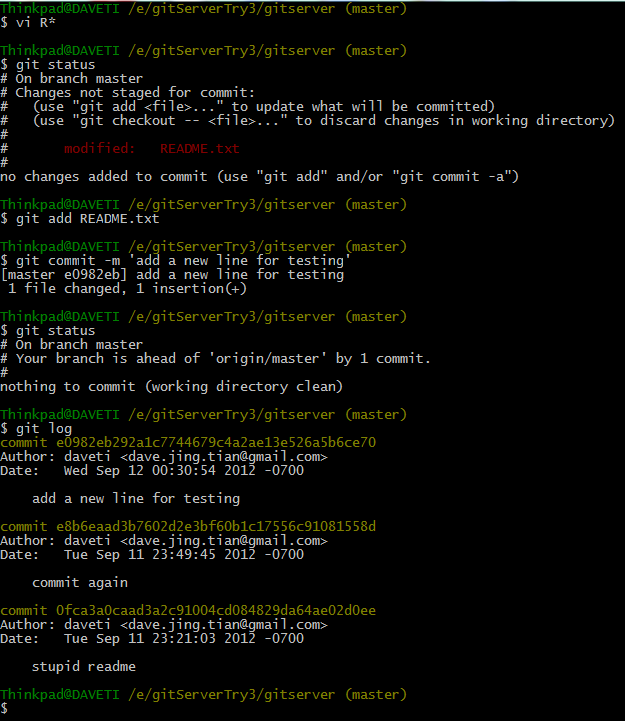
touch/vi README.txt
git init
git add README.txt
git commit -m “first commit”
git push origin master


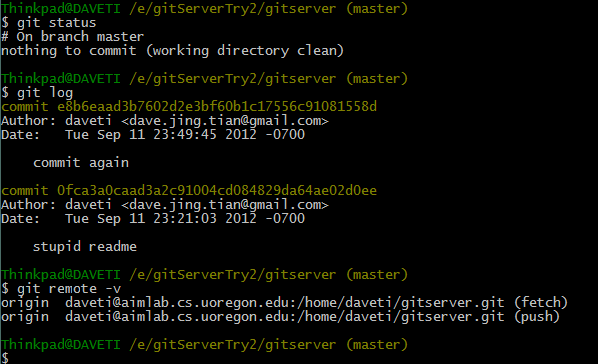
6. Other useful commands for git
git status
git log
git remote -v


7. Configure IDE for git connection
Eclipse:
http://help.eclipse.org/juno/index.jsp?topic=//org.eclipse.platform.doc.user/tasks/tasks-127.htm
NetBeans:
http://netbeans.org/kb/docs/ide/git.html

Posted in IDE_Make | Tagged , , , , , | 1 Comment

MySQL – cheat table

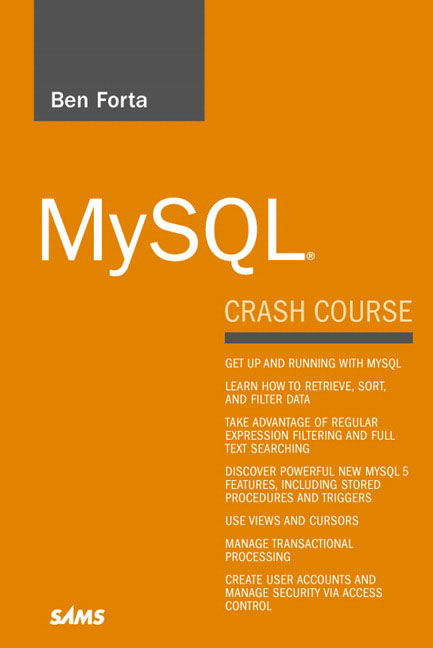
The first book I have read about SQL is Ben Forta’s ‘MySQL Crash Course’. I like Ben’s writing style where each chapter only contains few but important things worth doing hands-on trial and remembering. Generally, below is some notes after my reading this excellent book. Thanks Ben and his fabulous book!


# Installation
rpm -i MySQL-server-5.5.24-1.rhel5.i386.rpm
rpm -i MySQL-client-5.5.24-1.rhel5.i386.rpm

# MySQL Crash Courses
http://forta.com/books/0672327120/

# Password
/usr/bin/mysqladmin -u root password ‘new-password’

# Startup
mysql -u root -p

# MySQL Commands
CREATE DATABASE ‘dbName’;
SHOW DATABASES;
USE ‘dbName’;
SHOW TABLES;
SHOW COLUMNS FROM ‘tableName’;
DESCRIBE ‘tableName’;
help SHOW;
SELECT ‘columnName’ FROM ‘tableName’;
SELECT ‘columnName1’, ‘columnName2’ FROM ‘tableName’;
SELECT * FROM ‘tableName’;
SELECT DISTINCT ‘columnName’ FROM ‘tableName’;
SELECT ‘columnName’ FROM ‘tableName’ LIMIT ‘num’;
SELECT ‘columnName’ FROM ‘tableName’ LIMIT ‘lineIndex’, ‘num’;
SELECT ‘columnName’ FROM ‘tableName’ LIMIT ‘num’ OFFSET ‘lineIndex’;
SELECT ‘tableName’.’columnName’ FROM ‘dbName’.’tableName’;
SELECT ‘columnName’ FROM ‘tableName’ ORDER BY ‘columnName’;
SELECT ‘columnName1’, ‘columnName2’, ‘columnName3’ FROM ‘tableName’ ORDER BY ‘columnName2’, ‘columnName3’;
SELECT ‘columnName1’columnName2’, ‘columnName3’ FROM ‘tableName’ ORDER BY ‘columnName2’ DESC, ‘columnName3’;
SELECT ‘columnName1’, ‘columnName2’, ‘columnName3’ FROM ‘tableName’ ORDER BY ‘columnName2’ DESC, ‘columnName3’ DESC;
SELECT ‘columnName’ FROM ‘tableName’ ORDER BY ‘columnName’ DESC LIMIT ‘num’;
SELECT ‘columnName1’, ‘columnName2’, ‘columnName3’ FROM ‘tableName’ WHERE ‘condition’ ORDER BY ‘columnName3’;
SELECT ‘columnName1’ FROM ‘tableName’ WHERE ‘columnName2’ IS NULL;
SELECT ‘columnName1’, ‘columnName2’, ‘columenName3’ FROM ‘tableName’ WHERE ‘condition1’ AND ‘condition2’;
SELECT ‘columnName1’, ‘columnName2’, ‘columenName3’ FROM ‘tableName’ WHERE ‘condition1’ OR ‘condition2’;
SELECT ‘columnName1’, ‘columnName2’, ‘columenName3’ FROM ‘tableName’ WHERE ‘columnName1’ IN (‘value1’, ‘value2’);
SELECT ‘columnName1’, ‘columnName2’, ‘columenName3’ FROM ‘tableName’ WHERE ‘columnName1’ NOT IN (‘value1’, ‘value2’);
SELECT ‘columnName’ FROM ‘tableName’ WHERE ‘columnName’ LIKE ‘pattern’;
SELECT ‘columnName’ FROM ‘tableName’ WHERE ‘columnName’ REGEXP ‘pattern’;
SELECT Func(‘columnName1’, ‘columnName2’, …) AS ‘columnNameNew’ FROM ‘tableName’ ORDER BY ‘columnName1’;
SELECT ‘columnName’, Func() AS ‘columnNameNew’ FROM ‘tableName’ GROUP BY ‘columnName’;
SELECT ‘columnName’, Func() AS ‘columnNameNew’ FROM ‘tableName’ GROUP BY ‘columnName’ WITH ROLLUP;
SELECT ‘columnName’, COUNT(*) FROM ‘tableName’ GROUP BY ‘columnName’ HAVING COUNT(*) >= 2;
SELECT ‘columnName’, COUNT(*) FROM ‘tableName’ WHERE ‘condition’ GROUP BY ‘columnName’ HAVING COUNT(*) >= 2;
SELECT ‘columnName’, COUNT(*) FROM ‘tableName’ WHERE ‘condition’ GROUP BY ‘columnName’ HAVING COUNT(*) >= 2 ORDER BY ‘columnName’;
SELECT ‘columnName1’ FROM ‘tableName1’ WHERE ‘columnName2’ IN (SELECT ‘columnName2’ FROM ‘tableName2’ WHERE ‘columnName3’ IN (
        SELECT ‘columnName3’ FROM ‘tableName3’ WHERE ‘condition’);
SELECT ‘columnName1’, ‘columnName2’ FROM ‘tableName1’, ‘tableName2’ WHERE ‘tableName1’.’columnName3′ = ‘tableName2’.’columnName3′;
SELECT ‘columnName1’, ‘columnName2’ FROM ‘tableName1’ INNER JOIN ‘tableName2’ ON ‘tableName1’.’columnName3′ = ‘tableName2’.’columnName3′;
SELECT ‘columnName1’, ‘columnName2’ FROM ‘tableName1’ AS ‘name1’, ‘tableName2’ AS ‘name2’ WHERE ‘name1’.’columnName3′ = ‘name2’.’columnName3′;
SELECT ‘name1’.’columnName1′, ‘name1’.’columnName2′ FROM ‘tableName’ AS ‘name1’, ‘tableName’ AS ‘name2’ WHERE
        ‘name1’.’columnName3′ = ‘name2’.’columnName3′ AND ‘name2’.’columnName4′ = ‘daveti’;
SELECT ‘name1’.*, ‘name2’.’columnName2′ FROM ‘tableName1’ AS ‘name1’, ‘tableName2’ AS ‘name2’ WHERE ‘name1’.’columnName3′ = ‘name2’.’columnNam3′;
SELECT ‘columnName1’, ‘columnName2’ FROM ‘tableName1’ LEFT OUTER JOIN ‘tableName2’ ON ‘tableName1’.’columnName3′ = ‘tableName2’.’columnName3′;
SELECT ‘columnName1’, ‘columnName2’ FROM ‘tableName1’ RIGHT OUTER JOIN ‘tableName2’ ON ‘tableName1’.’columnName3′ = ‘tableName2’.’columnName3′;
SELECT ‘columnName1’, ‘columnName2’, ‘columnName3’ FROM ‘tableName’ WHERE ‘condition1’ UNION
        SELECT ‘columnName1’, ‘columnName2’, ‘columnName3’ FROM ‘tableName’ WHERE ‘condition2’ ORDER BY ‘columnName1’, ‘columnName2’;
SELECT ‘columnName1’, ‘columnName2’, ‘columnName3’ FROM ‘tableName’ WHERE ‘condition1’ UNION ALL
        SELECT ‘columnName1’, ‘columnName2’, ‘columnName3’ FROM ‘tableName’ WHERE ‘condition2’;
SELECT ‘columnName’ FROM ‘tableName’ WHERE Match(‘columanName’) Against(‘matchingString’);
SELECT ‘columnName’, Match(‘columnName’ Against(‘matchingString) AS ‘columnNameNew’ FROM ‘tableName’;
SELECT ‘columnName’ FROM ‘tableName’ WHERE Match(‘columnName’) Against(‘matchingString’ WITH QUERY EXPANSION);
SELECT ‘columnName’ FROM ‘tableName’ WHERE Match(‘columnName’) Against(‘matchingString’ IN BOOLEAN MODE);
SELECT ‘columnName’ FROM ‘tableName’ WHERE Match(‘columnName’) Against(‘booleanOperator_matchingString’ IN BOOLEAN MODE);
INSERT INTO ‘tableName’ VALUES(‘value1’, ‘value2’, …, ‘valueN’);
INSERT INTO ‘tableName'(‘columnName1’, ‘columnName2’, …, ‘columnNameN’) VALUES (‘value1’, ‘value2’, …, ‘valueN’);
INSERT LOW_PRIORITY INTO ‘tableName'(‘columnNameN’, ‘columnNameN-1’, …, ‘columnName1’) VALUES (‘valueN’, ‘valueN-1’, …, ‘value1’);
INSERT INTO ‘tableName'(‘columnName1’, ‘columnName2’, …, ‘columnNameN’)
        VALUES (‘value1’, ‘value2’, …, ‘valueN’), (‘value11’, ‘value22’, …, ‘valueNN’);
INSERT INTO ‘tableName1′(‘columnName1’, ‘columnName2’, …, ‘columnNameN’)
        SELECT(‘columnName11’, ‘columnName22’, …, ‘columnNameNN’) FROM ‘tableName2’ WHERE ‘condition’;
UPDATE ‘tableName’ SET ‘columnName1’ = ‘value1’, ‘columnName2’ = ‘value2’ WHERE ‘condition’;
UPDATE IGNORE ‘tableName’ SET ‘columnName1’ = NULL, ‘columnName2’ = ‘value2’ WHERE ‘condition’;
DELETE FROM ‘tableName’ WHERE ‘condition’;
CREATE TABLE tableName
{
        columnName1     type1   NOT NULL        AUTO_INCREMENT,
        columnName2     type2   NULL,
        columnName3     type3   NULL,
        columnName4     type4   NOT NULL        DEFAULT 1,
        …
        PRIMARY KEY (columnName1)
}ENGINE=engineName;
ALTER TABLE tableName ADD columnName type;
ALTER TABLE tableName DROP COLUMN columnName;
ALTEE TABLE tableName1 ADD CONSTRINT fk_tableName1_tableName2 FOREIGN KEY (columnName1) REFERENCES tableName2 (columnName2);
DROP TABLE tableName;
RENAME TABLE tableName1 TO tableName2;
CREATE VIEW viewName AS SELECT …;
SHOW CREATE VIEW viewName;
DROP VIEW viewName;
DELIMITER //
CREATE PROCEDURE procedureName( args…)
BEGIN
        SQL statements…
END //
DELIMITER ;
CALL procedureName( args…);
DELIMITER //
CREATE PROCEDURE productpricing2(
        OUT pl DECIMAL(8, 2),
        OUT ph DECIMAL(8, 2),
        OUT pa DECIMAL(8, 2))
BEGIN
        SELECT Min(prod_price)
        INTO pl
        FROM products;
        SELECT Max(prod_price)
        INTO ph
        FROM products;
        SELECT Avg(prod_price)
        INTO pa
        FROM products;
END //
DELIMITER ;
CALL productpricing2(@pl, @ph, @pa);
SELECT @pl, @ph, @pa;
DELIMITER //
CREATE PROCEDURE ordertotal(
        IN onumber INT,
        OUT ototal DECIMAL(8, 2))
BEGIN
        SELECT Sum(item_price*quantity)
        FROM orderitems
        WHERE order_num = onumber
        INTO ototal;
END //
DELIMITER ;
CALL ordertotal(20005, @ot);
SELECT @ot;
DROP PROCEDURE procedureName;
DROP PROCEDURE IF EXISTS procedureName;
SHOW CREATE PROCEDURE procedureName;
SHOW PROCEDURE STATUS;
DELIMITER //
CREATE TRIGGER triggerName BEFORE|AFTER DELETE|UPDATE|INSERT ON tableName
        FOR EACH ROW
        BEGIN
                SET|INSERT|UPDATE|…;
        END //
DELIMITER ;
DROP TRIGGER triggerName;
START TRANSACTION;
ROLLBACK|COMMIT|SAVEPOINT;
SHOW CHARACTER SET;
SHOW COLLATION;
SHOW VARIABLES;
CREATE USER userName IDENTIFIED BY ‘password’;
RENAME USER userName TO userName2;
DROP USER userName;
SHOW GRANTS FOR userName;
GRANT SELECT ON dbName.* TO userName;
REVOKE SELECT ON dbName.* FROM userName;
SET PASSWORD (FOR userName) = Password(‘new password’);
FLUSH TABLES;
ANALYZE TABLE tableName;
CHECK TABLE tableName;
REPAIR TABLE tableName;
OPTIMIZE TABLE tableName;
SHOW STATUS;
SHOW PROCESSLIST;

# SQL Syntax
help SELECT;
Name: ‘SELECT’
Description:
Syntax:
SELECT
[ALL | DISTINCT | DISTINCTROW ]
[HIGH_PRIORITY]
[STRAIGHT_JOIN]
[SQL_SMALL_RESULT] [SQL_BIG_RESULT] [SQL_BUFFER_RESULT]
[SQL_CACHE | SQL_NO_CACHE] [SQL_CALC_FOUND_ROWS]
select_expr [, select_expr …]
[FROM table_references
[WHERE where_condition]
[GROUP BY {col_name | expr | position}
[ASC | DESC], … [WITH ROLLUP]]
[HAVING where_condition]
[ORDER BY {col_name | expr | position}
[ASC | DESC], …]
[LIMIT {[offset,] row_count | row_count OFFSET offset}]
[PROCEDURE procedure_name(argument_list)]
[INTO OUTFILE ‘file_name’
[CHARACTER SET charset_name]
export_options
| INTO DUMPFILE ‘file_name’
| INTO var_name [, var_name]]
[FOR UPDATE | LOCK IN SHARE MODE]]

Posted in Programming | Tagged | Leave a comment

Hi, Oregon

Around 1 and a half hours air flight from Qingdao to Seoul; another 1 and a half hours waiting in the airport of Incheon; almost 11 hours air flight from Seoul to Seattle; another 5 hours waiting in the airport of Seattle-Tacoma; then the last 1 hour and a half air flight from Seattle to Eugene, I finally arrived at Oregon at 6:30 PM on Aug 16, 2012 (local time).

Hi US; Hi Oregon; Hi Eugene; Hi University of Oregon!

When looking back the past 20 hours, I find it not easy but blessed as always. When looking the familar coast line above the sky of Qingdao, I could not help crying like a baby; When trying to sleep in the dark and cold while flying to Seattle, I could not help dreaming about the bed at home, just the same dream as my first night in Eugene at Best Western Motel.

Are my days getting better? I am not sure of that. On the other hand, I know I am blessed as always. THANK YOU!

Posted in Life Prose | Tagged , , , | Leave a comment

Bye, Alcatel-Lucent

This Friday – Aug 10, 2012 was my last working day in Alcatel-Lucent (aka ALU, former Lucent Technologies) R&D Qingdao site. I joined Alcatel-Lucent R&D (former Lucent Technologies R&D) Qingdao site on December 1, 2008. Since then, I had been working as a software developer in group of Linux Control Platform (aka LCP) for almost 4 years.

There were always pains and gains during the past 4 years. Nevertheless, when then pain and the gain are not correlated anymore; when passion is corroded by the routine and process; when then calling and then rebelling are stronger and stronger in one’s heart deep inside, it is time to leave.

YOU gave my name ‘daveti’, which means invitation in Turkish; YOU let me know how technologies change the world, like Bell Labs once did; YOU made me be proud of being a software developer, which may be one of the most noble job in the world; YOU put me into the team, where people value technologies, love, pride, sharing and teamwork; YOU kept me out of the dirty world and told me how to follow your heart…THANK YOU!

God bless us! Bye…

Posted in Life Prose | Tagged , | Leave a comment

REPRINT: How to Write Scripts for Oracle Solaris with the Korn Shell

Original post: http://www.oracle.com/technetwork/articles/servers-storage-dev/kornshell-1523970.html?sc=APACOU12014452MPP001C017

REPRINT: How to Write Scripts for Oracle Solaris with the Korn Shell

by Ken Gottry, originally published August 2001


The basics of creating, executing, testing, and launching scripts to control Oracle Solaris with a Korn shell.  Includes tips for writing loops.


When programmers start to use Oracle Solaris, they want to begin programming scripts immediately. They’re not concerned initially with efficiency and elegance; they’re concerned with effectiveness. This article explains my proven shell programming techniques for getting started quickly. As you become more experienced, you can develop your own programming style and improve the efficiency and elegance of your scripts.

Thanks Ken for his good article!

Background

The command shell is the layer that interacts with the user and communicates with the operating system. When using MS-DOS, most people use the command.com shell; however a different shell can be specified via the COMSPEC environment variable.

Similarly, each UNIX user must select a command shell to use to communicate with UNIX. When a UNIX account is established, the system administrator selects the user’s default shell. Normal options are the Bourne shell (/bin/sh), the C shell (/bin/csh), the Korn shell (/bin/ksh,) and the Bourne Again shell (/bin/bash). While many developers use the C shell because of its C-like syntax, this is a subjective choice and this article uses the Korn shell exclusively. The syntax will not necessarily work under any other shell.

When you execute a shell script from the command line, your default shell is used. If your default shell is Korn, the scripts in this article will execute without syntax errors. But what if you want others to execute your script? You can’t rely on a user’s default shell to ensure that your scripts are always run using the Korn shell. The solution is to use a UNIX feature whereby the first line of a shell script indicates under which shell the script is to be executed. The example syntax in Listing 1 forces a script to be run using the Korn shell regardless of what shell the current user is executing.

Listing 1: Force a script to be executed by the Korn shell

#!/bin/ksh

# Your script goes here. All lines starting with # 
# are treated as comments.

Some documentation uses a different command prompt symbol to indicate the current shell, as shown in Table 1. (Since my favorite shell is the Korn shell, all the examples in this article use the $ prompt.) Since you cannot ensure that your scripts will always be executed using the Korn shell, put #!/bin/ksh as the first line in each script. (The $ prompt in this article just indicates that a command is being entered at the command line.)

Table 1. UNIX Prompt Symbols

Prompt Shell
$ Bourne or Korn shell
% C shell
# Root login

Writing a Script: Some Basics

A UNIX script file is similar to a DOS BAT file. All the programming do’s and don’ts from the DOS world still apply in UNIX.

Writing any script involves these steps:

  1. Run the UNIX command interactively at a shell prompt.
  2. Create the shell script containing the UNIX command.
  3. Make the shell script executable.
  4. Test the script.
  5. Launch the scriptin one of the following ways:
    • Interactively
    • Once, at a future date and time
    • Repeatedly on a fixed schedule
    • Using an HTML form

Writing a Simple Script

Assume that you want to write a script to capture vmstat information. You want to run vmstat on 2-second intervals for one minute. Use the five steps described above to achieve your goal.

Run the UNIX Command Interactively 30 Times at 2-second Intervals

First, look up the documentation for vmstat using man vmstat. Next, run the command interactively to be sure you understand the syntax and the expected output. Listing 2 shows the syntax to run vmstat 30 times at 2-second intervals.

Listing 2: Run the vmstat command interactively 30 times at 2-second intervals

$  vmstat  2  30

Create a Shell Script

Next, create a script file containing the command. You should establish standards describing script location and script names. Store all things of a specific category, for instance, a company, in a subdirectory under /usr/local.

For this example, assume the company is Acme Products so the directory is /usr/local/acme. Within this directory, create one subdirectory called scripts and another called logs. Other subdirectories might be necessary for other purposes.

Next, use a text editor such as vi to create a script file called capture_vmstat.sh. File extensions are meaningless in UNIX, unlike DOS, where EXE, COM, and BAT indicate executable files.

You could use .sh as an extension to denote shell script files, but that doesn’t make the script executable. This naming convention for files makes it easier to quickly identify files. Also, you can use the find command to locate all files of a particular type if the file names adhere to a standard.

The capture_vmstat.sh script file has two lines in it, as shown in Listing 3. The first line leaves nothing to chance, stating that the Korn shell should execute the commands inside this script. The second line is the UNIX command itself.

Listing 3: capture_vmstat.sh script to run vmstat 30 times at 2-second intervals

#!/bin/ksh

vmstat  2  30

Make the Shell Script Executable

Unlike DOS, which uses the file extension to determine whether a file is executable, UNIX relies on file permissions. The chmod command is used to mark the file executable.

The simplest way to turn on the execute bit is by using chmod +x capture_vmstat.sh.

In a production environment, on an exposed server, you must also consider owner, group, and world permissions to control complete access to the script. (The topic of file permissions is beyond the scope of this document.) See man chmod for more information.

Test the Shell Script

Now the script is ready to test. Unlike DOS, UNIX does not automatically look in the current directory for a file to execute. UNIX provides the PATH environment variable. UNIX will search for executables only in directories identified in the PATH variable. Since most people don’t include the current directory in the PATH (a dot indicates the current directory), just typing the code in Listing 4 will not work, because /usr/local/acme/scripts is not in the PATH.

Listing 4: This will NOT execute the script unless “dot” is in the PATH

$  cd /usr/local/acme/scripts

$  capture_vmstat.sh

You must explicitly specify the full file name of the script, including path. Do not rely on the PATH variable, because it could get changed in the future and one of two things could go wrong:

  • First, the directory where your scripts reside could be inadvertently removed from the PATH and UNIX would no longer be able to locate your scripts.
  • Worse yet, UNIX might find and execute a script by the same name in a different directory, one listed in the new PATH.

Therefore, to be safe, you should always execute your scripts by specifying the full file name, as shown in Listing 5.

Listing 5: Specifying the full file name to ensure UNIX finds the correct script

$  /usr/local/acme/scripts/capture_vmstat.sh

Maybe you don’t like typing, so a shortcut relies on the fact that a dot (.) refers to the current directory. First, change to the script directory, and then execute the script by prepending dot-slash (./) to the script name, as shown in Listing 6. This doesn’t save much typing if you are executing only one script; however, if you are going to execute several scripts from your script directory, you have to type the directory name only once.

Listing 6: Executing the script using the dot-slash notation

$  cd /usr/local/acme/scripts

$  ./capture_vmstat.sh

Regardless of how you invoke the capture_vmstat.sh script, the output should be identical to what you get when you run vmstat interactively.

Launch the Script

Now you have the script and you know it works. There are four ways to run the script:

1. Interactively. Document the script and let others (perhaps the Help Desk staff) run the script file. The folks who run the script don’t need to know UNIX commands or syntax in much the same way that DOS users don’t need to understand DOS commands or syntax in order to use a BAT file created for them.

2. Using the at command. Use the at command to execute a script once at some time in the future. Check man at for details. Some UNIX systems cancel running at jobs when a user logs out. Check system documentation carefully.

3. Using the cron utility. Use the crontab file to execute a script repeatedly on a fixed schedule. Check man crontab for details. Listing 7 shows a simple crontab entry to run your script once an hour from 8 a.m. through 5 p.m. at 10 minutes past the hour every Monday, Wednesday, and Friday:

Listing 7: crontab entry to run the capture_vmstat.sh script

10   8-17   *   *  1,3,5  /usr/local/acme/scripts/capture_vmstat.sh

Before moving on to the fourth method for launching your script, you need to understand two problems with running scripts via crontab:

  • First, since you are not logged in when the script is executed, you can’t rely on the Korn shell being the default shell. Therefore, you must be sure to use #!/bin/ksh as the first line of your script, as explained previously.
  • Second, the current version of your script sends its output to the terminal. When cron launches the script, there is no terminal, so cron must redirect stdout somewhere. The normal place is to the e-mail inbox of the user whose crontab launched the script. While this might be acceptable, other (better) solutions, described below, are available when you expand your basic script.

4. Using an HTML form. Launch your script using an HTML form and post your script via CGI (common gateway interface). The output of the command will be sent back to the browser, so the <pre> and </pre> HTML tags should be used to preserve formatting.

There is a bit more to this HTML form method than described here, and there are numerous security risks with using a form and CGI. However, this method has proven very successful for use by in-house Help Desk staff or other level-one support personnel.

Extending the Simple Script

The previous script was the shell-script version of hello, world, the standard first program written when learning a new programming language. Now you can add a few more basic features to it.

Redirecting stdout

First, the script sends its output to stdout, which is normally the terminal. You can extend the script to redirect the output to a log file, as shown in Listing 8.

Listing 8: Redirecting stdout to a file

#!/bin/ksh

vmstat  2  30  >  /usr/local/acme/logs/vmstat.log

But this introduces a couple of new problems. First, every time you run the script, it overwrites the contents of the last log file. To correct that, append the new output to the end of the existing log file. Now, you need to know when each output in the log was created, since the date-time stamp on the file indicates only when the last one was written.

Executing Subcommands Within the Script

Write the current date and time to the file preceding each execution of the script. Use >> to append the output to the end of the file rather than overwriting the existing file.

In Listing 9, a uniquely identifiable character is put in column one to make it easy to scan the file using find and find next.

You can also write the current date and time to the log file. In Listing 9, $(date) instructs the Korn shell to execute the date command and place the output into the echo command line. Whenever you want to execute a UNIX command and use the output, type a $ and enclose the command within parentheses.

Listing 9: Appending stdout to a log file

#!/bin/ksh

echo "#--- $(date)"  > /usr/local/acme/logs/vmstat.log

vmstat  2  30	> /usr/local/acme/logs/vmstat.log

In Listing 10, the Korn shell is instructed to run the netstat command, use grep to search for “ESTABLISH”, and use wc to count the number of lines by enclosing these commands in $(). Further, the Korn shell is instructed to store the output of these commands in environment variable CTR_ESTAB. Then in the echo command, the Korn shell is instructed to use the value stored in that environment variable. To use a value that is stored in an environment variable, put a $ in front of the variable name, for example, $CTR_ESTAB. To improve readability and to avoid ambiguities, use the Korn shell option of enclosing the variable name inside curly braces, for example, ${CTR_ESTAB}.

Listing 10: Using $(xxx) to execute a command within a Korn shell script

# store current date as YYYYMMDD in variable DATE for later 
# use

export DATE=$(date +m%d)

# count number of established socket connections and write 
# to log

export CTR_ESTAB=$(netstat -na -P tcp | grep ESTABLISH | wc 
  -l)

export CTR_CLOSE_WAIT=$(netstat -na -P tcp | grep CLOSE WAIT 
  | wc -l)

echo "${DATE} ${CTR_ESTAB} ${CTR_CLOSE_WAIT} >> ${LOG_FILE}

Generating Unique File Names

What happens if multiple users run the script concurrently? The output from each script would be interleaved in the output file since each instance of the script would be writing to the same output file. You can create a unique output file name by placing the PID number (represented by $$) in the file name, as shown in Listing 11.

Listing 11: Using $$ to generate unique file names using the current PID

#!/bin/ksh

echo "#--- $(date)" 
  >> /usr/local/acme/logs/vmstat.$$.log

vmstat  2  30	>> /usr/local/acme/logs/vmstat.$$.log

When the next user runs the script, a different PID will be assigned to the script’s execution, thus causing a separate log file to be created each time instead of appending the output to the existing log file. Maybe that’s not a bad thing, but it’s not what you want to achieve.

Another possibility, instead of using an environment variable whose value is changed each time the script is executed, is to use an environment variable that is set once, outside the script, prior to the execution of the script. UNIX automatically sets the LOGNAME environment variable whenever a user logs in. In Listing 12, this value is embedded into the log file name so that each user can have a log file:

Listing 12: Generating a file name using an environment variable whose value is set externally

#!/bin/ksh

echo "#--- $(date)"	
  >> /usr/local/acme/logs/vmstat.${LOGNAME}.log

vmstat  2  30		
  >> /usr/local/acme/logs/vmstat.${LOGNAME}.log

Structured Programming Techniques

Two final touch-ups and you’re finished with your basic Korn shell script. First, what if you want to change the frequency or duration of the vmstat command? You can accept those values using command line arguments rather than hard-coding the interval and duration in the vmstat command. These arguments can be stored in environment variables from which the vmstat command can access them. Of course, your script must provide default values in case the user doesn’t provide values using the command line.

Second, what if you change your mind about the log file naming convention? This is not something you want the user to have to provide each time using a command line argument. However, if you have hard-coded the log file name in multiple lines within the script, then when you decide to use a different naming convention, you will have to search every line of the script to see where the name was specified.

Instead, store the log file name in an environment variable and modify each command to append output to the file name contained in the variable. Then, when you change the log file naming convention, all you need to do is modify the one line where the environment variable is set, as shown in Listing 13.

Listing 13: A more robust version of the capture_vmstat.sh script

#!/bin/ksh
# ----------------------------------------------------
# capture_vmstat.sh	<INTERVAL> <COUNT>
#	<INTERVAL> vmstat interval
#	<COUNT>	vmstat count
# run vmstat and capture output to a log file
#-----------------------------------------------------

# indicate defaults for how often and for how long 
# to run vmstat
export INTERVAL=2		# every 2 seconds
export COUNT=30		# do it 30 times

# obtain command line arguments, if present
if [ "${1}" != "" ]
then
	INTERVAL=${1}
	# if there is one command line argument, 
	# maybe there's two
	if [ "${2}" != "" ]
	then
	COUNT=${2}
	fi
fi

# directories where scripts and logs are stored
export PROGDIR=/usr/local/acme/scripts
export LOGDIR=/usr/local/acme/logs

# define logfile name and location
export LOG_FILE=${LOGDIR}/capture_vmstat.${LOGNAME}.log

# write current date/time to log file
echo "#--- $(date)"		>> ${LOG_FILE}
vmstat  ${INTERVAL}  ${COUNT}	>> ${LOG_FILE}

# say goodnight, Gracie
exit 0

Writing a for Loop Script

Sometimes you want to execute a single command against a list of objects. For example, you may want to use the rsh command to remotely execute the same command against multiple servers (see man rsh for details and for security risks when using r commands).

One technique is to store the list of objects in an environment variable, perhaps called LIST. Then you can use the for loop to execute the rsh command repeatedly, with each loop having the next value in the LIST. Listing 14 shows a sample of a for loop script.

Listing 14: A simple for loop script

#!/bin/ksh

export LIST="bvapp1 bvapp2 bvapp3"

export LOG=/usr/local/acme/logs/throw_away.log

for SERVER in ${LIST}
do
  # each loop has a different value for ${SERVER}
  echo "#------- values from ${SERVER}" >> ${LOG}
  rsh  ${SERVER} 
  "ps -f -u bv -o pid,pmem,pcpu,rss,vsz" >> ${LOG}
done

# say goodnight, Gracie
exit 0

Writing a while Loop Script

Sometimes you might want to execute a single command, wait a while, and then execute the command again. Sometimes you want this loop to continue indefinitely, while other times you want the loop to execute a finite number of times and then terminate.

Say you want to monitor processes running under user bv. You want to monitor bv every 10 seconds for 2 hours. First, using the code in Listing 15, you test the command interactively (see man ps for details).

Listing 15: Interactive ps command using the -o argument

ps  -f -u bv  -o  pid,pcpu,pmem,rss,vsz,comm

Now you need to write a script file that executes this in a loop. The loop should pause for 10 seconds between executions of the ps command. The loop should execute 720 times [every 10 seconds means 6 times per minute or 360 times per hour (60 mins/hr * 6/min) for two hours]. Listing 16 shows a simple while loop script.

Listing 16: Simple while loop script

#!/bin/ksh

export INTERVAL=10
export COUNT=720

export LOG=/usr/local/acme/logs/while_loop_test.log

export CTR=0
while [ true ]
do
	if [ ${CTR} -ge ${COUNT} ]
	then
		exit
	fi
	echo "#------- $(date +m%d-03/24/03M%S)"	
          > ${LOG}
	ps  -f  -u  bv  -o  pid,pcpu,pmem,rss,vsz,comm	
          > ${LOG}
	CTR=$(expr ${CTR} + 1)
	sleep ${INTERVAL}
done

Listing 17 shows a snippet from the output log file.

Listing 17: Output from the while loop script

#------- 19991203-123237
  PID %CPU %MEM  RSS  VSZ COMMAND
12007  0.2  0.8 13640 24280 cmsdb
11938  0.0  0.7 11536 20496 sched_poll_d
<snip>
#------- 19991203-123240
  PID %CPU %MEM  RSS  VSZ COMMAND
12007  0.2  0.8 13640 24280 cmsdb
11938  0.0  0.7 11536 20496 sched_poll_d

<snip>
#------- 19991203-123243
  PID %CPU %MEM  RSS  VSZ COMMAND
12007  0.3  0.8 13640 24280 cmsdb
11938  0.0  0.7 11536 20496 sched_poll_d
<snip>
#------- 19991203-123246
<and so on>

Quick Reference Card

The programming tips and techniques in the following list are a quick reference to the programming style and methodology presented in this article. In the list, you will find a quick reference version of the items covered (in more detail) in the article.

  1. Always start scripts with this line:
    #!/bin/ksh
  2. Always use uppercase when defining variables. Use underscores to separate words.
    BIN_DIR=/opt/bv1to1/bin
  3. Always export environment variables so that any subprocesses will have automatic access to the values:
    export SUPPORT_IDS="userA@domain.com,userB@domain.com
  4. To execute a UNIX command and use the output elsewhere in a Korn shell script, type a $, enclose the command within parentheses, and store the output in an environment variable:
    export CTR_ESTAB=$(netstat -na | grep ESTABLISH | wc -l)
  5. To use a value that is stored in an environment variable, put a $ in front of the variable name. To improve readability and to avoid ambiguities, enclose the variable name inside curly braces.
    echo "The number of ESTABLISHED connections is ${CTR_ESTAB}"
  6. To ensure having a unique file name, use $$ to include the PID number in the file name. Insert the PID number into the file name just prior to the file extension.
    export LOG_FILE=/tmp/capture_vmstat.$$.log
  7. Use chmod +x filename to make a script file executable:
    chmod  +x  capture_vmstat.sh
  8. Precede a script name with dot-slash when executing interactively so UNIX knows that the script is in the current directory:
    ./capture_vmstat.sh
  9. Redirect stdout (>) to a log file or append stdout (>>) to a log file:
    ./capture_vmstat.sh >> ${LOG_FILE}
  10. Redirect stderr, either to the same destination as stdout or to a unique file:
    ./capture_vmstat.sh  >> ${LOG_FILE}  2>&1

    – or –

    ./capture_vmstat.sh  >> ${LOG_FILE}  2>>${ERR_LOG}
  11. Use the for loop to process a list of things:
    export LIST=$(ls *sh)
    for FILE in ${LIST}
    do
    	echo "Processing ${FILE}"
    	cat ${FILE} | mailx -s "Here is ${FILE}" 
              userA@domain.com
    done
  12. Use the while loop to process the same command repeatedly:
    export INTERVAL=20
    export COUNT=180
    
    export CTR=0
    while [ true ]
    do
    if [ ${CTR} -ge ${COUNT} ]
    	then
    		exit
    	fi
    	# --- do some command here ---
    	sleep ${INTERVAL}
    	      CTR=$(expr ${CTR} + 1) 
    done

References

Unix Shell Programming, Third Edition, by Stephen G. Kochan and Patrick H. Wood (Sams Publishing, 2003)

About the Author

Ken Gottry is a Sr. Infrastructure Architect with NerveWire, Inc. He has 30 years experience with systems ranging from mainframes to desktops. For the past 10 years his focus has been on designing, implementing, and tuning distributed, multitier, and Web-based systems. As a performance engineer consulting with numerous G2K firms, he has assessed and tuned Web servers, application servers, and Java Virtual Machines running on Oracle Solaris.

Revision 1.0, 02/15/2012

Posted in Programming | Tagged , | Leave a comment

Valgrind – dynamic code analysis tool – part VII – ERROR: ld.so: object ‘/dev/shm/valgrind/lib/valgrind/vgpreload_core-amd64-linux.so’ from LD_PRELOAD cannot be preloaded: ignored.

Recently encountered a ld error when starting 64-bit valgrind (3.7.0) for 64-bit binary. This is a bug in 3.7.0 and the fix will be submitted into 3.8.0. Detailed info could be found via (https://bugs.kde.org/show_bug.cgi?id=286270). As always, we could either checkout the latest SVN trunk which has already contained the fix or use ‘diff -u’ and ‘patch -p0’ to make the current code look good.

<tat09-s00c05h0:root>/dev/shm/valgrind/bin:
# ./valgrind –tool=helgrind –log-file=./helgrind.out /tmp/valgrind/dfed.elf –iomn 294921
ERROR: ld.so: object ‘/dev/shm/valgrind/lib/valgrind/vgpreload_core-amd64-linux.so’ from LD_PRELOAD cannot be preloaded: ignored.
ERROR: ld.so: object ‘/dev/shm/valgrind/lib/valgrind/vgpreload_helgrind-amd64-linux.so’ from LD_PRELOAD cannot be preloaded: ignored.

/home/daveti/dfed/concurrency: cat valgrind-3.7.0.daveti.linux_x86.diff
— valgrind-3.7.0/coregrind/m_libcproc.c.orig  2012-08-02 20:51:03.842835647 -0500
+++ valgrind-3.7.0/coregrind/m_libcproc.c       2012-08-03 01:00:03.721101101 -0500
@@ -240,12 +240,18 @@
    // – LD_PRELOAD is on Linux, not on Darwin, not sure about AIX
    // – DYLD_INSERT_LIBRARIES and DYLD_SHARED_REGION are Darwin-only
    for (i = 0; envp[i] != NULL; i++) {
–      if (VG_(strncmp)(envp[i], “LD_PRELOAD=”, 11) == 0)
–         ld_preload_str = VG_(arena_strdup)(VG_AR_CORE, “libcproc.erves.1”, &envp[i][11]);
–      if (VG_(strncmp)(envp[i], “LD_LIBRARY_PATH=”, 16) == 0)
–         ld_library_path_str = VG_(arena_strdup)(VG_AR_CORE, “libcproc.erves.2”, &envp[i][16]);
–      if (VG_(strncmp)(envp[i], “DYLD_INSERT_LIBRARIES=”, 22) == 0)
–         dyld_insert_libraries_str = VG_(arena_strdup)(VG_AR_CORE, “libcproc.erves.3”, &envp[i][22]);
+      if (VG_(strncmp)(envp[i], “LD_PRELOAD=”, 11) == 0) {
+         envp[i] = VG_(arena_strdup)(VG_AR_CORE, “libcproc.erves.1”, envp[i]);
+         ld_preload_str = &envp[i][11];
+      }
+      if (VG_(strncmp)(envp[i], “LD_LIBRARY_PATH=”, 16) == 0) {
+         envp[i] = VG_(arena_strdup)(VG_AR_CORE, “libcproc.erves.2”, envp[i]);
+         ld_library_path_str = &envp[i][16];
+      }
+      if (VG_(strncmp)(envp[i], “DYLD_INSERT_LIBRARIES=”, 22) == 0) {
+         envp[i] = VG_(arena_strdup)(VG_AR_CORE, “libcproc.erves.3”, envp[i]);
+         dyld_insert_libraries_str = &envp[i][22];
+      }
    }

    buf = VG_(arena_malloc)(VG_AR_CORE, “libcproc.erves.4”,
/home/daveti/dfed/concurrency:

Posted in Static Code Analysis | Tagged , , | Leave a comment

Valgrind – dynamic code analysis tool – part VI – configure: error: please use gcc >= 3.0 or clang >= 2.9

This post is trying to figure out the reason why configure of valgrind may report the error like this – configure: error: please use gcc >= 3.0 or clang >= 2.9 and the stupid workaround to make the building go thru.

5123 $as_echo_n “checking for a supported version of gcc… ” >&6; }
   5124
   5125 # Try to get the gcc version, sed-ing out some unexpected stuff
   5126 # that appears with the default gcc on OSX 10.6 and 10.7 respectively.
   5127 # Without this, the version number comes out as 686, 10 or 11 😦
   5128 #
   5129 # i686-apple-darwin10-gcc-4.2.1 (GCC) 4.2.1 (Apple Inc. build 5666) (dot 3)
   5130 # i686-apple-darwin11-llvm-gcc-4.2 (GCC) 4.2.1 (Based on Apple Inc. build 5658) (LLVM build 2335.15.00)
   5131 #
   5132 gcc_version=`${CC} –version
   5133              | head -n 1
   5134              | $SED ‘s/i686-apple-darwin10//’
   5135              | $SED ‘s/i686-apple-darwin11//’
   5136              | $SED ‘s/^[^0-9]*([0-9.]*).*$/1/’`
   5137
   5138 is_clang=”notclang”
   5139 if test “x`${CC} –version | head -n 1 | $SED ‘s/(clang) version.*/1/’`” = “xclang” ; then
   5140    is_clang=”clang”
   5141 fi
   5142
   5143 case “${is_clang}-${gcc_version}” in
   5144      notclang-3.*)
   5145         { $as_echo “$as_me:${as_lineno-$LINENO}: result: ok (${gcc_version})” >&5
   5146 $as_echo “ok (${gcc_version})” >&6; }
   5147         ;;
   5148      notclang-4.*)
   5149         { $as_echo “$as_me:${as_lineno-$LINENO}: result: ok (${gcc_version})” >&5
   5150 $as_echo “ok (${gcc_version})” >&6; }
   5151         ;;
   5152      clang-2.9)
   5153         { $as_echo “$as_me:${as_lineno-$LINENO}: result: ok (clang-${gcc_version})” >&5
   5154 $as_echo “ok (clang-${gcc_version})” >&6; }
   5155         ;;
   5156      *)
   5157         { $as_echo “$as_me:${as_lineno-$LINENO}: result: no (${gcc_version})” >&5
   5158 $as_echo “no (${gcc_version})” >&6; }
   5159         as_fn_error “please use gcc >= 3.0 or clang >= 2.9” “$LINENO” 5
   5160         ;;
   5161 esac
   5162

Above red lines are the issued code in configure of valgrind (3.7.0). Generally, the sed line was trying to hunt for the first number as gcc’s version from command ‘gcc -version’. Whether it works or not depends on different distribution of ‘gcc’.

/home_nbu/daveti/R2614/valgrind/sde/tpp/valgrind: cat lx86bld.out3
x86_64-redhat-linux-gcc (GCC) 4.1.2 20080704 (Red Hat 4.1.2-50)
Copyright (C) 2006 Free Software Foundation, Inc.
This is free software; see the source for copying conditions.  There is NO
warranty; not even for MERCHANTABILITY or FITNESS FOR A PARTICULAR PURPOSE.

/home_nbu/daveti/R2614/valgrind/sde/tpp/valgrind: cat lx86bld.out3 | head -n 1 | sed ‘s/i686-apple-darwin10//’ | sed ‘s/i686-apple-darwin11//’ | sed ‘s/^[^0-9]*([0-9.]*).*$/1/’
86
/home_nbu/daveti/R2614/valgrind/sde/tpp/valgrind

/home_nbu/daveti/R2614/valgrind/sde/tpp/valgrind: cat lx86bld.out4
i386-redhat-linux-gcc (GCC) 4.1.2 20080704 (Red Hat 4.1.2-50)
Copyright (C) 2006 Free Software Foundation, Inc.
This is free software; see the source for copying conditions.  There is NO
warranty; not even for MERCHANTABILITY or FITNESS FOR A PARTICULAR PURPOSE.

/home_nbu/daveti/R2614/valgrind/sde/tpp/valgrind: cat lx86bld.out4 | head -n 1 | sed ‘s/i686-apple-darwin10//’ | sed ‘s/i686-apple-darwin11//’ | sed ‘s/^[
^0-9]*([0-9.]*).*$/1/’
386
/home_nbu/daveti/R2614/valgrind/sde/tpp/valgrind

[root@localhost ~]# gcc –version
gcc (GCC) 4.1.2 20080704 (Red Hat 4.1.2-50)
Copyright (C) 2006 Free Software Foundation, Inc.
This is free software; see the source for copying conditions.  There is NO
warranty; not even for MERCHANTABILITY or FITNESS FOR A PARTICULAR PURPOSE.

[root@localhost ~]# gcc –version | head -n 1 | sed ‘s/i686-apple-darwin10//’ | sed ‘s/i686-apple-darwin11//’ | sed ‘s/^[^0-9]*([0-9.]*).*$/1/’
4.1.2
[root@localhost ~]#

The stupid workaround would be commenting the gcc version checking code above, though we could think about a better sed line, like hunting for the first number after ‘(GCC)’.

Posted in Static Code Analysis | Tagged , , | Leave a comment

Valgrind – dynamic code analysis tool – part V – valgrind: failed to start tool ‘memcheck’ for platform …

This post contains certain error message when ‘Valgrind’ is called: valgrind: failed to start tool ‘memcheck’ for platform ‘XXXXXX’: No such file or directory. There is a tricky question – can 32-bit valgrind be run on 64-bit platform? The answer is absolutely yes, just like many other 32-bits application do nowadays. However, the answer could not guarantee your ‘valgrind’ working. Let’s go step by step.

<tat09-s00c01h0:lss>/storage/daveti/x86_valgrind/bin:
# uname -a
Linux tat09-s00c01h0 2.6.18-308.8.2.el5 #1 SMP Tue May 29 11:54:17 EDT 2012 x86_64 x86_64 x86_64 GNU/Linux
<tat09-s00c01h0:lss>/storage/daveti/x86_valgrind/bin:
# file valgrind
valgrind: ELF 32-bit LSB executable, Intel 80386, version 1 (SYSV), for GNU/Linux 2.6.9, dynamically linked (uses shared libs), not stripped
<tat09-s00c01h0:lss>/storage/daveti/x86_valgrind/bin:
# ./valgrind
valgrind: failed to start tool 'memcheck' for platform 'x86-linux': No such file or directory

When running 32-bit valgrind on 64-bit platform without any option, we could find the corresponding error reported from valgrind. When valgrind is called without any option, ‘–tool=memcheck’ would be called by default, which will hunt for ‘memcheck-x86-linux’ internally. The fix for this is simple – exporting the corresponding lib dir used by valgrind.

<tat09-s00c01h0:lss>/storage/daveti/x86_valgrind/lib/valgrind:
# file memcheck-x86-linux
memcheck-x86-linux: ELF 32-bit LSB executable, Intel 80386, version 1 (SYSV), statically linked, not stripped
<tat09-s00c01h0:lss>/storage/daveti/x86_valgrind/lib/valgrind:
# export VALGRIND_LIB=$PWD
<tat09-s00c01h0:lss>/storage/daveti/x86_valgrind/lib/valgrind:
# cd ../../bin
<tat09-s00c01h0:lss>/storage/daveti/x86_valgrind/bin:
# ./valgrind
valgrind: no program specified
valgrind: Use --help for more information.
<tat09-s00c01h0:lss>/storage/daveti/x86_valgrind/bin:
# ./valgrind ls -l
valgrind: failed to start tool 'memcheck' for platform 'amd64-linux': No such file or directory
<tat09-s00c01h0:lss>/storage/daveti/x86_valgrind/bin:
# which ls
/bin/ls
<tat09-s00c01h0:lss>/storage/daveti/x86_valgrind/bin:
# file /bin/ls
/bin/ls: ELF 64-bit LSB executable, AMD x86-64, version 1 (SYSV), for GNU/Linux 2.6.9, dynamically linked (uses shared libs), stripped

When running 32-bit valgrind with ‘ls -l’, which means we tried to detect memory issue for binary ‘ls’, we may get the same error but with slight difference here.  The reason for this error is that ‘ls’ binary is 64-bit and ‘memcheck’ would search for its 64-bit implementation ‘memcheck-amd64-linux’ instead 32-bit one. There is no other way to solve this error rather than building 64-bit valgrind. Once 64-bit valgrind is ready, it looks like below:

<tat09-s00c01h0:lss>/storage/daveti/x86-64_valgrind/lib/valgrind:
# export VALGRIND_LIB=$PWD
<tat09-s00c01h0:lss>/storage/daveti/x86-64_valgrind/lib/valgrind:
# cd ../../bin
<tat09-s00c01h0:lss>/storage/daveti/x86-64_valgrind/bin:
# ./valgrind ls -l
==17314== Memcheck, a memory error detector
==17314== Copyright (C) 2002-2011, and GNU GPL'd, by Julian Seward et al.
==17314== Using Valgrind-3.7.0 and LibVEX; rerun with -h for copyright info
==17314== Command: ls -l
==17314==
total 340
-rwx------ 1 lss lss 40873 Jul 23 10:39 callgrind_annotate
-rwx------ 1 lss lss 11522 Jul 23 10:39 callgrind_control
-rwx------ 1 lss lss 32169 Jul 23 10:39 cg_annotate
-rwx------ 1 lss lss 10417 Jul 23 10:39 cg_diff
-rwx------ 1 lss lss 55965 Jul 23 10:39 cg_merge
-rwx------ 1 lss lss 24211 Jul 23 10:39 ms_print
-rwx------ 1 lss lss 40115 Jul 23 10:39 valgrind
-rwx------ 1 lss lss 23848 Jul 23 10:39 valgrind-listener
-rwx------ 1 lss lss 92633 Jul 23 10:39 vgdb
==17314==
==17314== HEAP SUMMARY:
==17314==     in use at exit: 19,435 bytes in 16 blocks
==17314==   total heap usage: 93 allocs, 77 frees, 66,928 bytes allocated
==17314==
==17314== LEAK SUMMARY:
==17314==    definitely lost: 0 bytes in 0 blocks
==17314==    indirectly lost: 0 bytes in 0 blocks
==17314==      possibly lost: 0 bytes in 0 blocks
==17314==    still reachable: 19,435 bytes in 16 blocks
==17314==         suppressed: 0 bytes in 0 blocks
==17314== Rerun with --leak-check=full to see details of leaked memory
==17314==
==17314== For counts of detected and suppressed errors, rerun with: -v
==17314== ERROR SUMMARY: 0 errors from 0 contexts (suppressed: 7 from 7)
Posted in Static Code Analysis | Tagged , , | Leave a comment

Valgrind – dynamic code analysis tool – part IV – DRD

Valgrind – DRD – while Helgrind is the major tool for concurrency issue detection, some options of DRD are also helpful on debugging concurrency issue, especially –exclusive-threshold, used to report mutex locked for long, and –shared-threshold, used to report shared rwlock locked for long, by certain thread.

# DRD
http://valgrind.org/docs/manual/drd-manual.html
--tool=drd
--read-var-info=yes
--exclusive-threshold=<n>
--shared-threshold=<n>
[root@localhost tests]# cat hold_lock.c
/** Hold several types of synchronization objects locked as long as specified.
 */

#define _GNU_SOURCE 1

#include <assert.h>
#include <pthread.h>
#include <stdio.h>
#include <stdlib.h>
#include <time.h>
#include <unistd.h>


static void delay_ms(const int ms)
{
 struct timespec ts;

 assert(ms >= 0);
 ts.tv_sec = ms / 1000;
 ts.tv_nsec = (ms % 1000) * 1000 * 1000;
 nanosleep(&ts, 0);
}

int main(int argc, char** argv)
{
 int interval = 0;
 int optchar;
 pthread_mutex_t mutex;
 pthread_mutexattr_t mutexattr;
 pthread_rwlock_t rwlock;

 while ((optchar = getopt(argc, argv, "i:")) != EOF)
 {
 switch (optchar)
 {
 case 'i':
 interval = atoi(optarg);
 break;
 default:
 fprintf(stderr, "Usage: %s [-i <interval time in ms>].n", argv[0]);
 break;
 }
 }

 fprintf(stderr, "Locking mutex ...n");

 pthread_mutexattr_init(&mutexattr);
 pthread_mutexattr_settype(&mutexattr, PTHREAD_MUTEX_RECURSIVE);
 pthread_mutex_init(&mutex, &mutexattr);
 pthread_mutexattr_destroy(&mutexattr);
 pthread_mutex_lock(&mutex);
 delay_ms(interval);
 pthread_mutex_lock(&mutex);
 pthread_mutex_unlock(&mutex);
 pthread_mutex_unlock(&mutex);
 pthread_mutex_destroy(&mutex);

 fprintf(stderr, "Locking rwlock exclusively ...n");

 pthread_rwlock_init(&rwlock, 0);
 pthread_rwlock_wrlock(&rwlock);
 delay_ms(interval);
 pthread_rwlock_unlock(&rwlock);
 pthread_rwlock_destroy(&rwlock);

 fprintf(stderr, "Locking rwlock shared ...n");

 pthread_rwlock_init(&rwlock, 0);
 pthread_rwlock_rdlock(&rwlock);
 delay_ms(interval);
 pthread_rwlock_rdlock(&rwlock);
 pthread_rwlock_unlock(&rwlock);
 pthread_rwlock_unlock(&rwlock);
 pthread_rwlock_destroy(&rwlock);

 fprintf(stderr, "Done.n");

 return 0;
}
[root@localhost valgrindTest]# gcc -Wall -g -lpthread -o hold_lock hold_lock.c
[root@localhost valgrindTest]# valgrind --tool=drd --exclusive-threshold=50 --shared-threshold=100 ./hold_lock -i 150
==32519== drd, a thread error detector
==32519== Copyright (C) 2006-2011, and GNU GPL'd, by Bart Van Assche.
==32519== Using Valgrind-3.7.0 and LibVEX; rerun with -h for copyright info
==32519== Command: ./hold_lock -i 150
==32519==
Locking mutex ...
==32519== Acquired at:
==32519== at 0x400D21B: pthread_mutex_lock (drd_pthread_intercepts.c:615)
==32519== by 0x80489F1: main (hold_lock.c:51)
==32519== Lock on mutex 0xbe9b79a4 was held during 158 ms (threshold: 50 ms).
==32519== at 0x400D7C4: pthread_mutex_unlock (drd_pthread_intercepts.c:665)
==32519== by 0x8048A1D: main (hold_lock.c:55)
==32519== mutex 0xbe9b79a4 was first observed at:
==32519== at 0x401133F: pthread_mutex_init (drd_pthread_intercepts.c:576)
==32519== by 0x80489DB: main (hold_lock.c:49)
==32519==
Locking rwlock exclusively ...
==32519== Acquired at:
==32519== at 0x4010846: pthread_rwlock_wrlock (drd_pthread_intercepts.c:1134)
==32519== by 0x8048A6B: main (hold_lock.c:61)
==32519== Lock on rwlock 0xbe9b7980 was held during 153 ms (threshold: 50 ms).
==32519== at 0x401112F: pthread_rwlock_unlock (drd_pthread_intercepts.c:1221)
==32519== by 0x8048A81: main (hold_lock.c:63)
==32519== rwlock 0xbe9b7980 was first observed at:
==32519== at 0x401034C: pthread_rwlock_init (drd_pthread_intercepts.c:1080)
==32519== by 0x8048A60: main (hold_lock.c:60)
==32519==
Locking rwlock shared ...
==32519== Acquired at:
==32519== at 0x4010666: pthread_rwlock_rdlock (drd_pthread_intercepts.c:1116)
==32519== by 0x8048ACF: main (hold_lock.c:69)
==32519== Lock on rwlock 0xbe9b7980 was held during 154 ms (threshold: 100 ms).
==32519== at 0x401112F: pthread_rwlock_unlock (drd_pthread_intercepts.c:1221)
==32519== by 0x8048AFB: main (hold_lock.c:73)
==32519== rwlock 0xbe9b7980 was first observed at:
==32519== at 0x401034C: pthread_rwlock_init (drd_pthread_intercepts.c:1080)
==32519== by 0x8048AC4: main (hold_lock.c:68)
==32519==
Done.
==32519==
==32519== For counts of detected and suppressed errors, rerun with: -v
==32519== ERROR SUMMARY: 3 errors from 3 contexts (suppressed: 0 from 0)
[root@localhost valgrindTest]#
Posted in Static Code Analysis | Tagged , , , , , | Leave a comment